

Inside Swix AI
- FeaturesChat, assistants, automations and agents, built for destination teams.
- Agents (AI Workforce)An agent team that plans the work, does it, and checks in when a person has to decide.
- AI AutomationsQuickFlows, ActionFlows and SmartFlows for the work you repeat.
- AssistantsCustom assistants that know your role, your files and your voice.
- ChatAsk in plain words, get back reports, decks and dashboards.
- AI knowledge baseOne library of your files that everything in Swix reads from.
- Security & TrustHow your data is encrypted, isolated and never used to train outside AI models.
 In their words30 min“What used to take me hours now takes me 30 minutes tops.”Jenna McCormick · Destination Creative & Content Manager, Visit Cheyenne
 AgentsPlans the work, does it, and stops for your okay.
 AI AutomationsA monthly board report, drafted in five numbered steps.
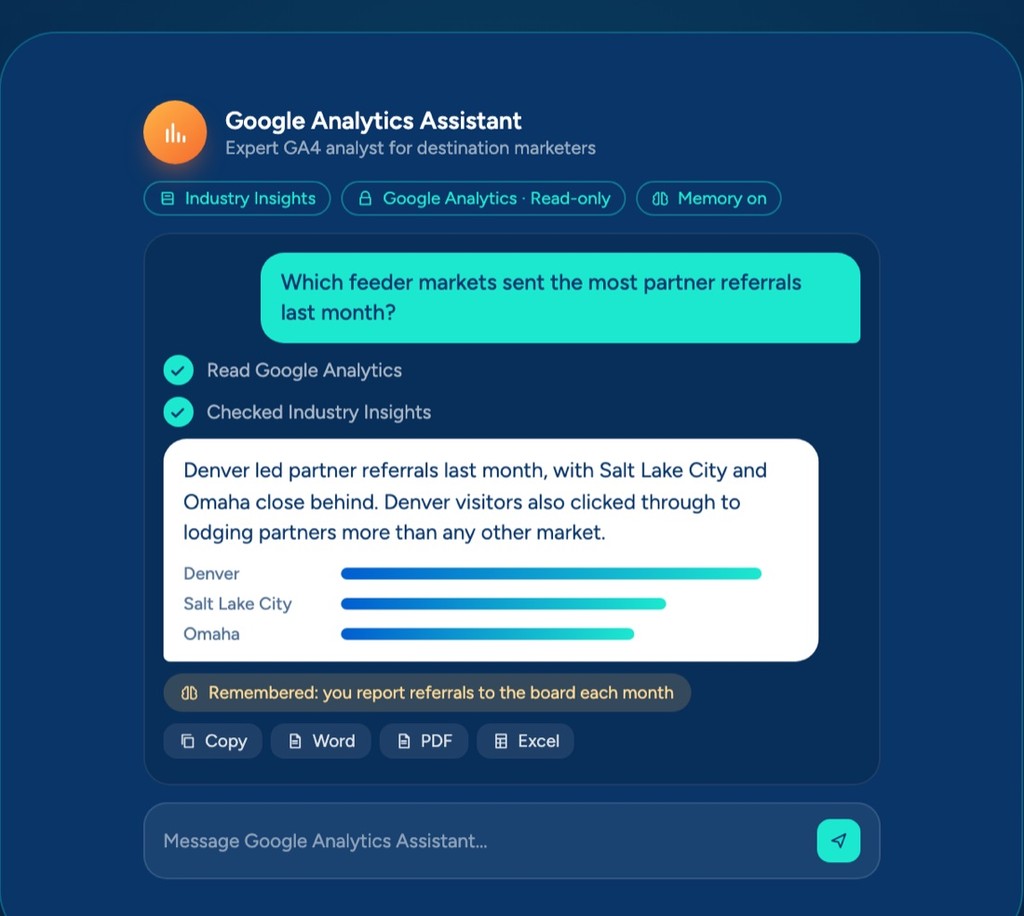 AssistantsAnswers from your Google Analytics, with read-only access.
 ChatOne prompt, a finished board report you can share.
 AI knowledge baseYour files, read by every assistant, agent and flow.
Swix AI
- Reading the inbox
- Drafting RFP replies
- Updating partner listings
- Agents on shift
- Swix
- AI
- Open
Home
BlogOct 20, 2026 · 7 min
The small signals nobody knew to share
Your team hears small things every day that matter months later. Why your DMO needs a shared memory, and a first look at the one we built.

Key takeaways
- Your team picks up small signals every day, and most of them never get written down because nobody knew they mattered.
- A personal second brain helps one person. An office version rolls up what the whole team knows and stays with the organization when people move on.
- Shared drives are the right home for documents, but they drift because keeping them tidy is nobody's job. AI makes a far better librarian.
- Swix IQ reads your drives, meeting notes and quick notes, suggests what's worth keeping, and a person on your team approves it before anything counts.
"There's no opportunity to collect small signals that add up to a meaningful insight, because we wouldn't know to share those small signals."
Janette Roush at Brand USA wrote that in August, and I haven't been able to shake it since.
Back in July I wrote that your destination knows more than it remembers. This is the follow-up, and fair warning, it's about something we built, so feel free to call me biased.
Your team gathers intelligence all day
Janette's point (she got the idea from Tom Blomfield at Y Combinator) is pretty simple. Your team picks up intelligence constantly. Convention sales hears which bids your competitors are winning. Partnerships hears about a hotel renovation before anybody else in the building does. So where does all of that live today? Her answer is the honest one. "If you're lucky, maybe in your CRM as a couple of notes. More likely, in the brain of the person who had the conversation or received the email."
The small-signals line is the one that got me. I'd spent a lot of time on the knowledge that walks out when a person leaves, and not nearly enough on the knowledge that never gets said out loud, because on the day it happened it didn't seem worth mentioning.
I saw a version of this recently. I sat with an events manager and asked her to walk me through a big annual event like I was her new hire. The most valuable thing in the whole conversation was a handoff to a colleague that she does every year, at the same point, in the same way. It existed nowhere except her head, and she'd never have thought to write it down.
Now multiply that by everyone on your team. Which hotels flex on room blocks, which board member always asks about ROI, which partner to call first when a group needs rooms fast... you get the idea. Most of it lives in one person's head.
Why it has to belong to the whole office
I built a second brain for myself, and it's changed how I work. I'd still recommend one to anybody. But a personal one only knows what one person knows. The office version is the roll-up, what your whole team knows in one place, and it stays with your organization when people move on. In my opinion it's also the one that gets better over time, because everyone adds to it and every correction makes it sharper. The small signals are a good example of why that matters.
A small signal is rarely useful on its own. Picture your sales manager hearing a planner grumble about flight options into your market, the same week partnerships hears the big downtown hotel is pushing its renovation into spring. Neither one is worth a meeting. Together, they might be a reason to rethink the fall group push, but only if they end up in the same place (and two personal notebooks will never put them there).
That's what silos usually look like at a DMO. Nobody's hoarding anything, sales and partnerships just rarely have a reason to compare notes. And think about how small most of our teams are. Destinations International puts the median DMO at about 17 full-time staff, so a lot of departments are one or two people deep and one resignation can take most of a department's memory with it.
An office version also has to do a couple of things a personal one never worries about. Somebody has to decide what's true, so it doesn't just believe whoever typed last, and not everything belongs in front of everyone.
Keep your drive. It just needs a librarian.
Let me be fair to the shared drive first. Most DMOs already have one, and it's the right home for your documents. Plenty of teams have pointed ChatGPT or Copilot at it too, which is a fine first step.
Here's a quick test, though. Which version of last year's partner program is the current one? And what happens when two files disagree? If you had to think about either one, you're in very good company.
I've lived this one. At a company I worked at before Swix, we rebuilt our whole shared drive. New folder structure, subfolders nested just right, and a naming convention everybody agreed on. It was honestly beautiful. Six months later, you'd never have known we did it. Files were back to whatever names people had always used, saved wherever they used to save them. Nobody did anything wrong. We made the change and then left the upkeep to busy people, and that's where it broke.
Drives drift like that no matter how good the structure is, because keeping them tidy is a job nobody actually has. We're all busy, and honestly, most of us aren't great librarians... AI is.
A chatbot pointed at a folder reads the old draft and the final version the same way, and it only answers when someone thinks to ask. A shared brain does the librarian work on top of your drive. It reads what's there, suggests what's worth keeping, and a person on your team signs off, so it's clear which version to trust. It also holds what never made it into a document, like the planner's comment or the renovation news.
What that looks like in Swix IQ
Swix IQ is our take on this. We built it for destinations, and it's part of the Swix AI platform.
If you've used a knowledge base before (Swix has those too), this is a different thing. A knowledge base is a library of documents your assistants search, and you decide who sees it, whether that's one team, a few, or everyone. IQ is the whole office's memory. It pulls out the facts, has a person confirm them and connects them, so it can know things no single document says. The simple way I'd think about it... if a team needs it, it goes in a knowledge base. If everyone should know it, it goes in IQ.
You start by pointing IQ at what you already have. That's your shared folders in Google Drive, OneDrive or Dropbox, meeting notes you export from tools like Granola or Fireflies, and any documents or spreadsheets you upload. It keeps up as they change, and it only reads your files, it never edits them. When someone hears one of those small signals, they can jot a quick note in IQ or save a passage from any web page with the Chrome extension, without changing how they work.
From there, IQ pulls out what looks worth keeping and sorts it by department, like Meeting & Convention Sales or Partnerships & Membership. Then someone on your team approves it, edits it or rejects it.
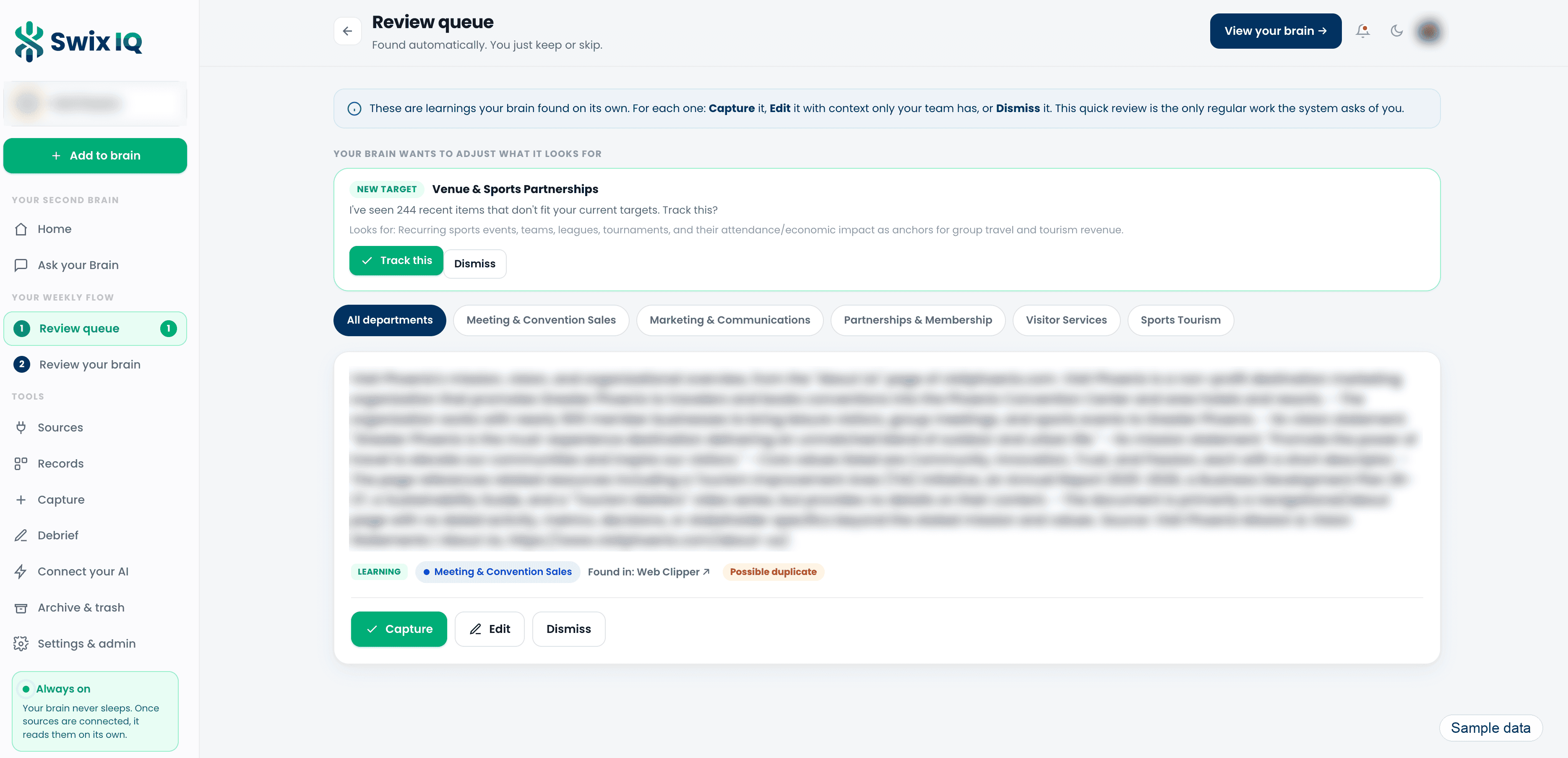
I'll be honest, that review step is also the limitation, and I'd rather you hear it from me. Nothing becomes trusted knowledge until a person approves it. There's a lot in the queue at the start while it works through what you already have, and after that I'd expect a couple of quick check-ins a week. We built it that way on purpose, because a system that quietly absorbs its own mistakes will eventually hand them back to you as fact.
A quick word on what goes in. The brain is for things you'd be comfortable with your whole office knowing, or at least your whole leadership team, so that's how I'd pick the folders you point it at. Material like board or financial notes can be kept leadership-only, and IQ flags that kind of thing on its own as a safety net. But some things should never go in at all, like performance reviews, sensitive HR matters, passwords or API keys.
As your team approves things, the memory builds itself. Spreadsheets turn into records for your partners, venues and events. The topics that come up most get their own page that stays current, and a map shows how it all connects.
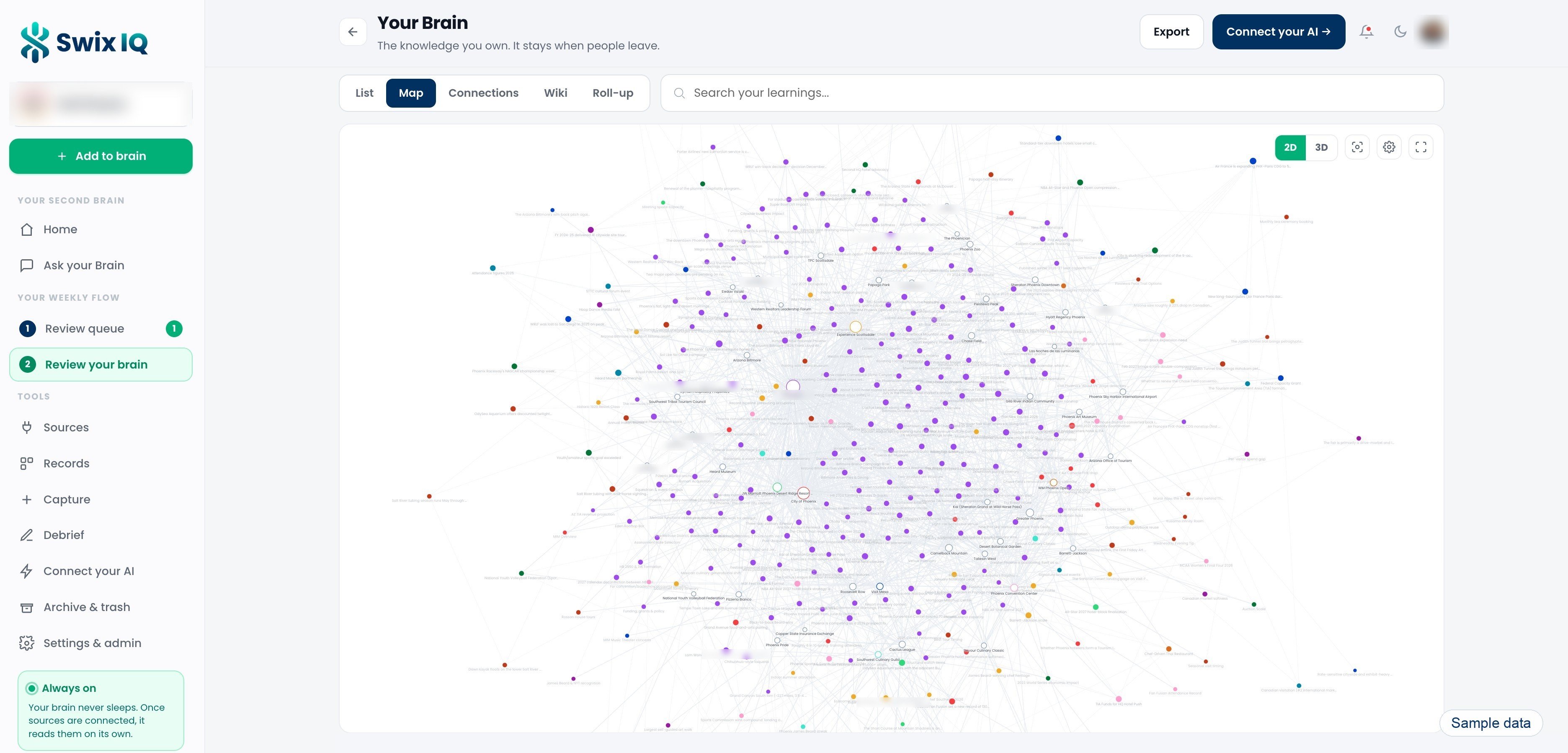
Then people ask instead of hunting. APQC found knowledge workers spend about 2.8 hours a week looking for or requesting information, and IQ turns a lot of that into a question you ask the way you'd ask a colleague. Every answer shows where it came from. Ask for a number, like how many partners renew this quarter, and it counts your actual records. If it can't answer, it tells you instead of guessing (which is more than a lot of chatbots will do).
It also speaks up before anyone asks. Once a day it flags a pattern, a risk or an opportunity across what your team has kept, with the evidence behind it. Connect your calendar and it'll pull together what your team already knows about the people you're about to meet. And when someone gives notice, there's a guided debrief you can run before their last day.
And this is the part I'm most excited about. Because IQ is part of Swix AI, the rest of the platform draws on it too. Your assistants, your agents (we call them the AI Workforce) and your flows all work from what your team actually knows. So the content assistant knows the downtown hotel pushed its renovation, and the board report flow knows which numbers your board always asks about.
It's also yours. What IQ builds belongs to your organization, and you can download your notes, wiki pages and records anytime as plain files you can open without us.
Or start this week with one conversation
You don't need any software to see how much of this is sitting in your building. Pick one veteran on your team and ask them to walk you through something they own, start to finish, like you're their new hire. Listen for the steps that aren't written down anywhere, the who-to-call and the "oh, and I always..." moments. I'd bet you hear at least one in the first fifteen minutes.
Then picture that across your whole office. That'll tell you more about whether this is worth solving than any demo could.
Somebody on your team will hear something small this week that matters six months from now. I'd just like it to end up somewhere a colleague can find it.
-Jason
We build AI tools made specifically for DMOs at Swix AI. If you'd like to see Swix IQ and the rest of Swix AI in action, I'm happy to walk you through it.
Credit where it's due. Janette Roush wrote the post that sharpened half of this, and she credits Tom Blomfield and Y Combinator for the original idea. The search-time figure is from APQC's 2021 productivity survey. The staffing median is from Destinations International's performance reporting platform.
Questions people ask
What's the difference between a knowledge base and Swix IQ?
A knowledge base is a library of documents your assistants search, and you decide which team or teams can see it. Swix IQ is the whole office's memory. It pulls the facts out of everything it reads, has a person confirm them and connects them. If a team needs it, it goes in a knowledge base. If everyone should know it, it goes in IQ.
Do we have to clean up our shared drive first?
No. Your drive can stay the way it is. IQ reads it, suggests what's worth keeping and a person approves it, so it's clear which version to trust without reorganizing anything.
What shouldn't go into a shared brain?
Anything you wouldn't want the whole office, or at least your whole leadership team, to know. Never put in performance reviews, sensitive HR matters, passwords or API keys.
BlogOct 20, 2026 · 7 min
The small signals nobody knew to share
Your team hears small things every day that matter months later. Why your DMO needs a shared memory, and a first look at the one we built.
Key takeaways
- Your team picks up small signals every day, and most of them never get written down because nobody knew they mattered.
- A personal second brain helps one person. An office version rolls up what the whole team knows and stays with the organization when people move on.
- Shared drives are the right home for documents, but they drift because keeping them tidy is nobody's job. AI makes a far better librarian.
- Swix IQ reads your drives, meeting notes and quick notes, suggests what's worth keeping, and a person on your team approves it before anything counts.
"There's no opportunity to collect small signals that add up to a meaningful insight, because we wouldn't know to share those small signals."
Janette Roush at Brand USA wrote that in August, and I haven't been able to shake it since.
Back in July I wrote that your destination knows more than it remembers. This is the follow-up, and fair warning, it's about something we built, so feel free to call me biased.
Your team gathers intelligence all day
Janette's point (she got the idea from Tom Blomfield at Y Combinator) is pretty simple. Your team picks up intelligence constantly. Convention sales hears which bids your competitors are winning. Partnerships hears about a hotel renovation before anybody else in the building does. So where does all of that live today? Her answer is the honest one. "If you're lucky, maybe in your CRM as a couple of notes. More likely, in the brain of the person who had the conversation or received the email."
The small-signals line is the one that got me. I'd spent a lot of time on the knowledge that walks out when a person leaves, and not nearly enough on the knowledge that never gets said out loud, because on the day it happened it didn't seem worth mentioning.
I saw a version of this recently. I sat with an events manager and asked her to walk me through a big annual event like I was her new hire. The most valuable thing in the whole conversation was a handoff to a colleague that she does every year, at the same point, in the same way. It existed nowhere except her head, and she'd never have thought to write it down.
Now multiply that by everyone on your team. Which hotels flex on room blocks, which board member always asks about ROI, which partner to call first when a group needs rooms fast... you get the idea. Most of it lives in one person's head.
Why it has to belong to the whole office
I built a second brain for myself, and it's changed how I work. I'd still recommend one to anybody. But a personal one only knows what one person knows. The office version is the roll-up, what your whole team knows in one place, and it stays with your organization when people move on. In my opinion it's also the one that gets better over time, because everyone adds to it and every correction makes it sharper. The small signals are a good example of why that matters.
A small signal is rarely useful on its own. Picture your sales manager hearing a planner grumble about flight options into your market, the same week partnerships hears the big downtown hotel is pushing its renovation into spring. Neither one is worth a meeting. Together, they might be a reason to rethink the fall group push, but only if they end up in the same place (and two personal notebooks will never put them there).
That's what silos usually look like at a DMO. Nobody's hoarding anything, sales and partnerships just rarely have a reason to compare notes. And think about how small most of our teams are. Destinations International puts the median DMO at about 17 full-time staff, so a lot of departments are one or two people deep and one resignation can take most of a department's memory with it.
An office version also has to do a couple of things a personal one never worries about. Somebody has to decide what's true, so it doesn't just believe whoever typed last, and not everything belongs in front of everyone.
Keep your drive. It just needs a librarian.
Let me be fair to the shared drive first. Most DMOs already have one, and it's the right home for your documents. Plenty of teams have pointed ChatGPT or Copilot at it too, which is a fine first step.
Here's a quick test, though. Which version of last year's partner program is the current one? And what happens when two files disagree? If you had to think about either one, you're in very good company.
I've lived this one. At a company I worked at before Swix, we rebuilt our whole shared drive. New folder structure, subfolders nested just right, and a naming convention everybody agreed on. It was honestly beautiful. Six months later, you'd never have known we did it. Files were back to whatever names people had always used, saved wherever they used to save them. Nobody did anything wrong. We made the change and then left the upkeep to busy people, and that's where it broke.
Drives drift like that no matter how good the structure is, because keeping them tidy is a job nobody actually has. We're all busy, and honestly, most of us aren't great librarians... AI is.
A chatbot pointed at a folder reads the old draft and the final version the same way, and it only answers when someone thinks to ask. A shared brain does the librarian work on top of your drive. It reads what's there, suggests what's worth keeping, and a person on your team signs off, so it's clear which version to trust. It also holds what never made it into a document, like the planner's comment or the renovation news.
What that looks like in Swix IQ
Swix IQ is our take on this. We built it for destinations, and it's part of the Swix AI platform.
If you've used a knowledge base before (Swix has those too), this is a different thing. A knowledge base is a library of documents your assistants search, and you decide who sees it, whether that's one team, a few, or everyone. IQ is the whole office's memory. It pulls out the facts, has a person confirm them and connects them, so it can know things no single document says. The simple way I'd think about it... if a team needs it, it goes in a knowledge base. If everyone should know it, it goes in IQ.
You start by pointing IQ at what you already have. That's your shared folders in Google Drive, OneDrive or Dropbox, meeting notes you export from tools like Granola or Fireflies, and any documents or spreadsheets you upload. It keeps up as they change, and it only reads your files, it never edits them. When someone hears one of those small signals, they can jot a quick note in IQ or save a passage from any web page with the Chrome extension, without changing how they work.
From there, IQ pulls out what looks worth keeping and sorts it by department, like Meeting & Convention Sales or Partnerships & Membership. Then someone on your team approves it, edits it or rejects it.
I'll be honest, that review step is also the limitation, and I'd rather you hear it from me. Nothing becomes trusted knowledge until a person approves it. There's a lot in the queue at the start while it works through what you already have, and after that I'd expect a couple of quick check-ins a week. We built it that way on purpose, because a system that quietly absorbs its own mistakes will eventually hand them back to you as fact.
A quick word on what goes in. The brain is for things you'd be comfortable with your whole office knowing, or at least your whole leadership team, so that's how I'd pick the folders you point it at. Material like board or financial notes can be kept leadership-only, and IQ flags that kind of thing on its own as a safety net. But some things should never go in at all, like performance reviews, sensitive HR matters, passwords or API keys.
As your team approves things, the memory builds itself. Spreadsheets turn into records for your partners, venues and events. The topics that come up most get their own page that stays current, and a map shows how it all connects.
Then people ask instead of hunting. APQC found knowledge workers spend about 2.8 hours a week looking for or requesting information, and IQ turns a lot of that into a question you ask the way you'd ask a colleague. Every answer shows where it came from. Ask for a number, like how many partners renew this quarter, and it counts your actual records. If it can't answer, it tells you instead of guessing (which is more than a lot of chatbots will do).
It also speaks up before anyone asks. Once a day it flags a pattern, a risk or an opportunity across what your team has kept, with the evidence behind it. Connect your calendar and it'll pull together what your team already knows about the people you're about to meet. And when someone gives notice, there's a guided debrief you can run before their last day.
And this is the part I'm most excited about. Because IQ is part of Swix AI, the rest of the platform draws on it too. Your assistants, your agents (we call them the AI Workforce) and your flows all work from what your team actually knows. So the content assistant knows the downtown hotel pushed its renovation, and the board report flow knows which numbers your board always asks about.
It's also yours. What IQ builds belongs to your organization, and you can download your notes, wiki pages and records anytime as plain files you can open without us.
Or start this week with one conversation
You don't need any software to see how much of this is sitting in your building. Pick one veteran on your team and ask them to walk you through something they own, start to finish, like you're their new hire. Listen for the steps that aren't written down anywhere, the who-to-call and the "oh, and I always..." moments. I'd bet you hear at least one in the first fifteen minutes.
Then picture that across your whole office. That'll tell you more about whether this is worth solving than any demo could.
Somebody on your team will hear something small this week that matters six months from now. I'd just like it to end up somewhere a colleague can find it.
-Jason
We build AI tools made specifically for DMOs at Swix AI. If you'd like to see Swix IQ and the rest of Swix AI in action, I'm happy to walk you through it.
Credit where it's due. Janette Roush wrote the post that sharpened half of this, and she credits Tom Blomfield and Y Combinator for the original idea. The search-time figure is from APQC's 2021 productivity survey. The staffing median is from Destinations International's performance reporting platform.
Questions people ask
What's the difference between a knowledge base and Swix IQ?
A knowledge base is a library of documents your assistants search, and you decide which team or teams can see it. Swix IQ is the whole office's memory. It pulls the facts out of everything it reads, has a person confirm them and connects them. If a team needs it, it goes in a knowledge base. If everyone should know it, it goes in IQ.
Do we have to clean up our shared drive first?
No. Your drive can stay the way it is. IQ reads it, suggests what's worth keeping and a person approves it, so it's clear which version to trust without reorganizing anything.
What shouldn't go into a shared brain?
Anything you wouldn't want the whole office, or at least your whole leadership team, to know. Never put in performance reviews, sensitive HR matters, passwords or API keys.
BlogOct 20, 2026 · 7 min
Your team hears small things every day that matter months later. Why your DMO needs a shared memory, and a first look at the one we built.
Key takeaways
- Your team picks up small signals every day, and most of them never get written down because nobody knew they mattered.
- A personal second brain helps one person. An office version rolls up what the whole team knows and stays with the organization when people move on.
- Shared drives are the right home for documents, but they drift because keeping them tidy is nobody's job. AI makes a far better librarian.
- Swix IQ reads your drives, meeting notes and quick notes, suggests what's worth keeping, and a person on your team approves it before anything counts.
"There's no opportunity to collect small signals that add up to a meaningful insight, because we wouldn't know to share those small signals."
Janette Roush at Brand USA wrote that in August, and I haven't been able to shake it since.
Back in July I wrote that your destination knows more than it remembers. This is the follow-up, and fair warning, it's about something we built, so feel free to call me biased.
Your team gathers intelligence all day
Janette's point (she got the idea from Tom Blomfield at Y Combinator) is pretty simple. Your team picks up intelligence constantly. Convention sales hears which bids your competitors are winning. Partnerships hears about a hotel renovation before anybody else in the building does. So where does all of that live today? Her answer is the honest one. "If you're lucky, maybe in your CRM as a couple of notes. More likely, in the brain of the person who had the conversation or received the email."
The small-signals line is the one that got me. I'd spent a lot of time on the knowledge that walks out when a person leaves, and not nearly enough on the knowledge that never gets said out loud, because on the day it happened it didn't seem worth mentioning.
I saw a version of this recently. I sat with an events manager and asked her to walk me through a big annual event like I was her new hire. The most valuable thing in the whole conversation was a handoff to a colleague that she does every year, at the same point, in the same way. It existed nowhere except her head, and she'd never have thought to write it down.
Now multiply that by everyone on your team. Which hotels flex on room blocks, which board member always asks about ROI, which partner to call first when a group needs rooms fast... you get the idea. Most of it lives in one person's head.
Why it has to belong to the whole office
I built a second brain for myself, and it's changed how I work. I'd still recommend one to anybody. But a personal one only knows what one person knows. The office version is the roll-up, what your whole team knows in one place, and it stays with your organization when people move on. In my opinion it's also the one that gets better over time, because everyone adds to it and every correction makes it sharper. The small signals are a good example of why that matters.
A small signal is rarely useful on its own. Picture your sales manager hearing a planner grumble about flight options into your market, the same week partnerships hears the big downtown hotel is pushing its renovation into spring. Neither one is worth a meeting. Together, they might be a reason to rethink the fall group push, but only if they end up in the same place (and two personal notebooks will never put them there).
That's what silos usually look like at a DMO. Nobody's hoarding anything, sales and partnerships just rarely have a reason to compare notes. And think about how small most of our teams are. Destinations International puts the median DMO at about 17 full-time staff, so a lot of departments are one or two people deep and one resignation can take most of a department's memory with it.
An office version also has to do a couple of things a personal one never worries about. Somebody has to decide what's true, so it doesn't just believe whoever typed last, and not everything belongs in front of everyone.
Keep your drive. It just needs a librarian.
Let me be fair to the shared drive first. Most DMOs already have one, and it's the right home for your documents. Plenty of teams have pointed ChatGPT or Copilot at it too, which is a fine first step.
Here's a quick test, though. Which version of last year's partner program is the current one? And what happens when two files disagree? If you had to think about either one, you're in very good company.
I've lived this one. At a company I worked at before Swix, we rebuilt our whole shared drive. New folder structure, subfolders nested just right, and a naming convention everybody agreed on. It was honestly beautiful. Six months later, you'd never have known we did it. Files were back to whatever names people had always used, saved wherever they used to save them. Nobody did anything wrong. We made the change and then left the upkeep to busy people, and that's where it broke.
Drives drift like that no matter how good the structure is, because keeping them tidy is a job nobody actually has. We're all busy, and honestly, most of us aren't great librarians... AI is.
A chatbot pointed at a folder reads the old draft and the final version the same way, and it only answers when someone thinks to ask. A shared brain does the librarian work on top of your drive. It reads what's there, suggests what's worth keeping, and a person on your team signs off, so it's clear which version to trust. It also holds what never made it into a document, like the planner's comment or the renovation news.
What that looks like in Swix IQ
Swix IQ is our take on this. We built it for destinations, and it's part of the Swix AI platform.
If you've used a knowledge base before (Swix has those too), this is a different thing. A knowledge base is a library of documents your assistants search, and you decide who sees it, whether that's one team, a few, or everyone. IQ is the whole office's memory. It pulls out the facts, has a person confirm them and connects them, so it can know things no single document says. The simple way I'd think about it... if a team needs it, it goes in a knowledge base. If everyone should know it, it goes in IQ.
You start by pointing IQ at what you already have. That's your shared folders in Google Drive, OneDrive or Dropbox, meeting notes you export from tools like Granola or Fireflies, and any documents or spreadsheets you upload. It keeps up as they change, and it only reads your files, it never edits them. When someone hears one of those small signals, they can jot a quick note in IQ or save a passage from any web page with the Chrome extension, without changing how they work.
From there, IQ pulls out what looks worth keeping and sorts it by department, like Meeting & Convention Sales or Partnerships & Membership. Then someone on your team approves it, edits it or rejects it.
I'll be honest, that review step is also the limitation, and I'd rather you hear it from me. Nothing becomes trusted knowledge until a person approves it. There's a lot in the queue at the start while it works through what you already have, and after that I'd expect a couple of quick check-ins a week. We built it that way on purpose, because a system that quietly absorbs its own mistakes will eventually hand them back to you as fact.
A quick word on what goes in. The brain is for things you'd be comfortable with your whole office knowing, or at least your whole leadership team, so that's how I'd pick the folders you point it at. Material like board or financial notes can be kept leadership-only, and IQ flags that kind of thing on its own as a safety net. But some things should never go in at all, like performance reviews, sensitive HR matters, passwords or API keys.
As your team approves things, the memory builds itself. Spreadsheets turn into records for your partners, venues and events. The topics that come up most get their own page that stays current, and a map shows how it all connects.
Then people ask instead of hunting. APQC found knowledge workers spend about 2.8 hours a week looking for or requesting information, and IQ turns a lot of that into a question you ask the way you'd ask a colleague. Every answer shows where it came from. Ask for a number, like how many partners renew this quarter, and it counts your actual records. If it can't answer, it tells you instead of guessing (which is more than a lot of chatbots will do).
It also speaks up before anyone asks. Once a day it flags a pattern, a risk or an opportunity across what your team has kept, with the evidence behind it. Connect your calendar and it'll pull together what your team already knows about the people you're about to meet. And when someone gives notice, there's a guided debrief you can run before their last day.
And this is the part I'm most excited about. Because IQ is part of Swix AI, the rest of the platform draws on it too. Your assistants, your agents (we call them the AI Workforce) and your flows all work from what your team actually knows. So the content assistant knows the downtown hotel pushed its renovation, and the board report flow knows which numbers your board always asks about.
It's also yours. What IQ builds belongs to your organization, and you can download your notes, wiki pages and records anytime as plain files you can open without us.
Or start this week with one conversation
You don't need any software to see how much of this is sitting in your building. Pick one veteran on your team and ask them to walk you through something they own, start to finish, like you're their new hire. Listen for the steps that aren't written down anywhere, the who-to-call and the "oh, and I always..." moments. I'd bet you hear at least one in the first fifteen minutes.
Then picture that across your whole office. That'll tell you more about whether this is worth solving than any demo could.
Somebody on your team will hear something small this week that matters six months from now. I'd just like it to end up somewhere a colleague can find it.
-Jason
We build AI tools made specifically for DMOs at Swix AI. If you'd like to see Swix IQ and the rest of Swix AI in action, I'm happy to walk you through it.
Credit where it's due. Janette Roush wrote the post that sharpened half of this, and she credits Tom Blomfield and Y Combinator for the original idea. The search-time figure is from APQC's 2021 productivity survey. The staffing median is from Destinations International's performance reporting platform.
Questions people ask
What's the difference between a knowledge base and Swix IQ?
A knowledge base is a library of documents your assistants search, and you decide which team or teams can see it. Swix IQ is the whole office's memory. It pulls the facts out of everything it reads, has a person confirm them and connects them. If a team needs it, it goes in a knowledge base. If everyone should know it, it goes in IQ.
Do we have to clean up our shared drive first?
No. Your drive can stay the way it is. IQ reads it, suggests what's worth keeping and a person approves it, so it's clear which version to trust without reorganizing anything.
What shouldn't go into a shared brain?
Anything you wouldn't want the whole office, or at least your whole leadership team, to know. Never put in performance reviews, sensitive HR matters, passwords or API keys.
Book a demo
Ready when you are.
Tell us where the hours go. We'll show you Swix working on your destination's real work, and what your first 60 days would look like.
No slides. No obligation.
Book a demo
Ready when you are.
Tell us where the hours go. We'll show you Swix working on your destination's real work, and what your first 60 days would look like.
No slides. No obligation.