
Inside Swix AI
- FeaturesChat, assistants, automations and agents, built for destination teams.
- Agents (AI Workforce)An agent team that plans the work, does it, and checks in when a person has to decide.
- AI AutomationsQuickFlows, ActionFlows and SmartFlows for the work you repeat.
- AssistantsCustom assistants that know your role, your files and your voice.
- ChatAsk in plain words, get back reports, decks and dashboards.
- AI knowledge baseOne library of your files that everything in Swix reads from.
- Security & TrustHow your data is encrypted, isolated and never used to train outside AI models.
 In their words30 min“What used to take me hours now takes me 30 minutes tops.”Jenna McCormick · Destination Creative & Content Manager, Visit Cheyenne
 AgentsPlans the work, does it, and stops for your okay.
 AI AutomationsA monthly board report, drafted in five numbered steps.
 AssistantsAnswers from your Google Analytics, with read-only access.
 ChatOne prompt, a finished board report you can share.
 AI knowledge baseYour files, read by every assistant, agent and flow.
Swix AI
- Reading the inbox
- Drafting RFP replies
- Updating partner listings
- Agents on shift
- Swix
- AI
- Open
Home
AI Assistants
Build one for a role once, and it shows up ready to work with your files, your voice and the tools you allow.
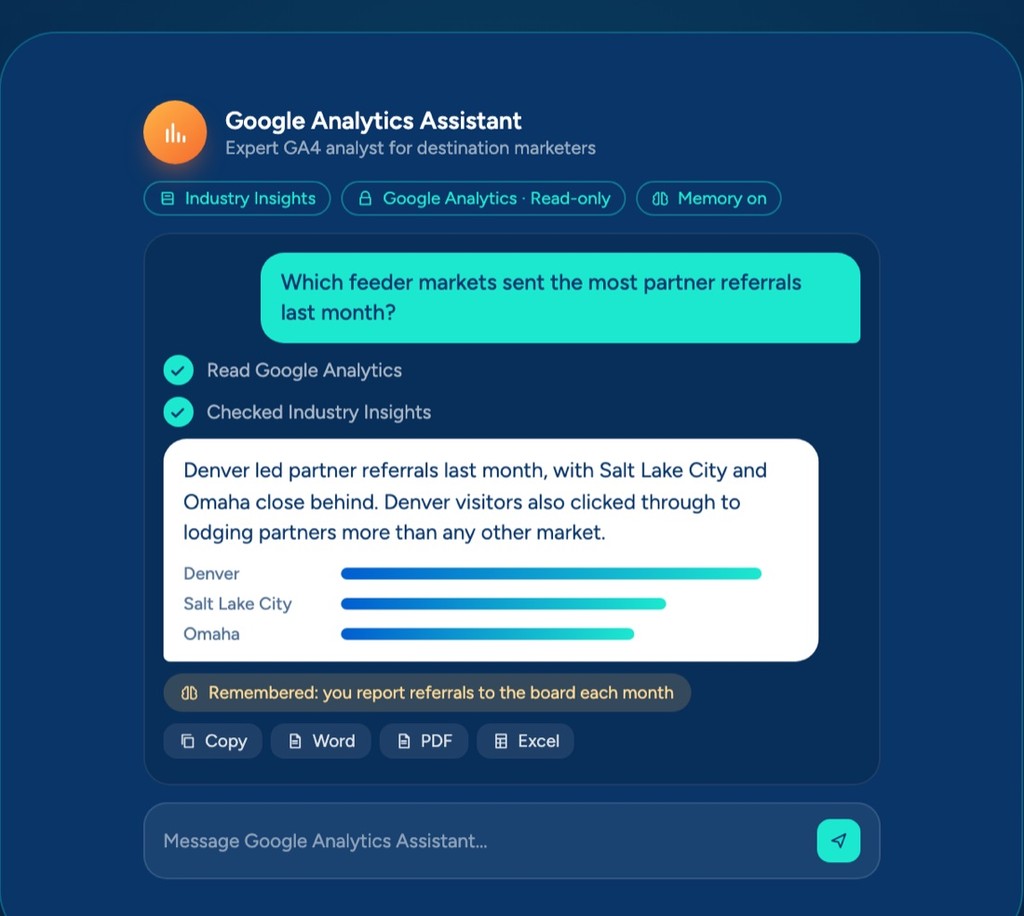
Denver led partner referrals last month, with Salt Lake City and Omaha close behind. Denver visitors also clicked through to lodging partners more than any other market.
Chat with an assistant the way you'd ask a colleague, and it answers and drafts from your own files instead of guessing.
Set it up once, the way you'd brief a new hire
You are a senior Google Analytics consultant who specializes in destination marketing organizations. You know a DMO website is an inspiration and referral engine, where the best outcomes happen on a partner's site…
Give your board their own assistant
Point an assistant at your board meeting notes, then share it by link or with a code. Board members ask questions anytime and get answers from your notes, with no Swix login.
Visitors only get what you allow. Your knowledge is read-only, your connected apps stay off unless you turn them on, and it politely declines anything outside its purpose. You can also embed it as a chat bubble on a website.
What did we decide about the spring campaign budget?
You approved it at the March meeting, with a review planned for June. Source: Board minutes, March
Assistants we've built, one for each role
Every reply can be copied or downloaded as Word, PDF or a spreadsheet. Need a polished report, deck or dashboard? Copy the reply into Chat and turn it into one.
Working with Swix has made my life infinitely easier. My assistant drafts things so closely to my style that I barely have to edit.
 Amber Trevizo, PDMDirector of Visitor Experience · Visit Cheyenne
How it works
- 01
Pick a role your team needs help with
- 02
Write the instructions, or let Build with AI draft them
- 03
Add the files and knowledge bases it should know
- 04
Connect its apps and set what it's allowed to do
What's included
- Your choice of AI model for each assistant
- Files it always knows plus as many knowledge bases as you want
- Rolling memory you can read, edit or clear
- Read-only, custom or full access for each app
- Share by link or code, or embed it on a website
- Replies you can copy or download as Word, PDF or a spreadsheet
Works with
AI Assistants
Build one for a role once, and it shows up ready to work with your files, your voice and the tools you allow.
Denver led partner referrals last month, with Salt Lake City and Omaha close behind. Denver visitors also clicked through to lodging partners more than any other market.
Chat with an assistant the way you'd ask a colleague, and it answers and drafts from your own files instead of guessing.
Set it up once, the way you'd brief a new hire
You are a senior Google Analytics consultant who specializes in destination marketing organizations. You know a DMO website is an inspiration and referral engine, where the best outcomes happen on a partner's site…
Give your board their own assistant
Point an assistant at your board meeting notes, then share it by link or with a code. Board members ask questions anytime and get answers from your notes, with no Swix login.
Visitors only get what you allow. Your knowledge is read-only, your connected apps stay off unless you turn them on, and it politely declines anything outside its purpose. You can also embed it as a chat bubble on a website.
What did we decide about the spring campaign budget?
You approved it at the March meeting, with a review planned for June. Source: Board minutes, March
Assistants we've built, one for each role
Every reply can be copied or downloaded as Word, PDF or a spreadsheet. Need a polished report, deck or dashboard? Copy the reply into Chat and turn it into one.
Working with Swix has made my life infinitely easier. My assistant drafts things so closely to my style that I barely have to edit.
Amber Trevizo, PDMDirector of Visitor Experience · Visit CheyenneHow it works
- 01
Pick a role your team needs help with
- 02
Write the instructions, or let Build with AI draft them
- 03
Add the files and knowledge bases it should know
- 04
Connect its apps and set what it's allowed to do
What's included
- Your choice of AI model for each assistant
- Files it always knows plus as many knowledge bases as you want
- Rolling memory you can read, edit or clear
- Read-only, custom or full access for each app
- Share by link or code, or embed it on a website
- Replies you can copy or download as Word, PDF or a spreadsheet
Works with
AI Assistants
Build one for a role once, and it shows up ready to work with your files, your voice and the tools you allow.
Denver led partner referrals last month, with Salt Lake City and Omaha close behind. Denver visitors also clicked through to lodging partners more than any other market.
Chat with an assistant the way you'd ask a colleague, and it answers and drafts from your own files instead of guessing.
Set it up once, the way you'd brief a new hire
You are a senior Google Analytics consultant who specializes in destination marketing organizations. You know a DMO website is an inspiration and referral engine, where the best outcomes happen on a partner's site…
Give your board their own assistant
Point an assistant at your board meeting notes, then share it by link or with a code. Board members ask questions anytime and get answers from your notes, with no Swix login.
Visitors only get what you allow. Your knowledge is read-only, your connected apps stay off unless you turn them on, and it politely declines anything outside its purpose. You can also embed it as a chat bubble on a website.
What did we decide about the spring campaign budget?
You approved it at the March meeting, with a review planned for June. Source: Board minutes, March
Assistants we've built, one for each role
Every reply can be copied or downloaded as Word, PDF or a spreadsheet. Need a polished report, deck or dashboard? Copy the reply into Chat and turn it into one.
Working with Swix has made my life infinitely easier. My assistant drafts things so closely to my style that I barely have to edit.
Amber Trevizo, PDMDirector of Visitor Experience · Visit CheyenneHow it works
- 01
Pick a role your team needs help with
- 02
Write the instructions, or let Build with AI draft them
- 03
Add the files and knowledge bases it should know
- 04
Connect its apps and set what it's allowed to do
What's included
- Your choice of AI model for each assistant
- Files it always knows plus as many knowledge bases as you want
- Rolling memory you can read, edit or clear
- Read-only, custom or full access for each app
- Share by link or code, or embed it on a website
- Replies you can copy or download as Word, PDF or a spreadsheet
Works with
Book a demo
Ready when you are.
Tell us where the hours go. We'll show you Swix working on your destination's real work, and what your first 60 days would look like.
No slides. No obligation.
Book a demo
Ready when you are.
Tell us where the hours go. We'll show you Swix working on your destination's real work, and what your first 60 days would look like.
No slides. No obligation.