
Inside Swix AI
- FeaturesChat, assistants, automations and agents, built for destination teams.
- Agents (AI Workforce)An agent team that plans the work, does it, and checks in when a person has to decide.
- AI AutomationsQuickFlows, ActionFlows and SmartFlows for the work you repeat.
- AssistantsCustom assistants that know your role, your files and your voice.
- ChatAsk in plain words, get back reports, decks and dashboards.
- AI knowledge baseOne library of your files that everything in Swix reads from.
- Security & TrustHow your data is encrypted, isolated and never used to train outside AI models.
 In their words30 min“What used to take me hours now takes me 30 minutes tops.”Jenna McCormick · Destination Creative & Content Manager, Visit Cheyenne
 AgentsPlans the work, does it, and stops for your okay.
 AI AutomationsA monthly board report, drafted in five numbered steps.
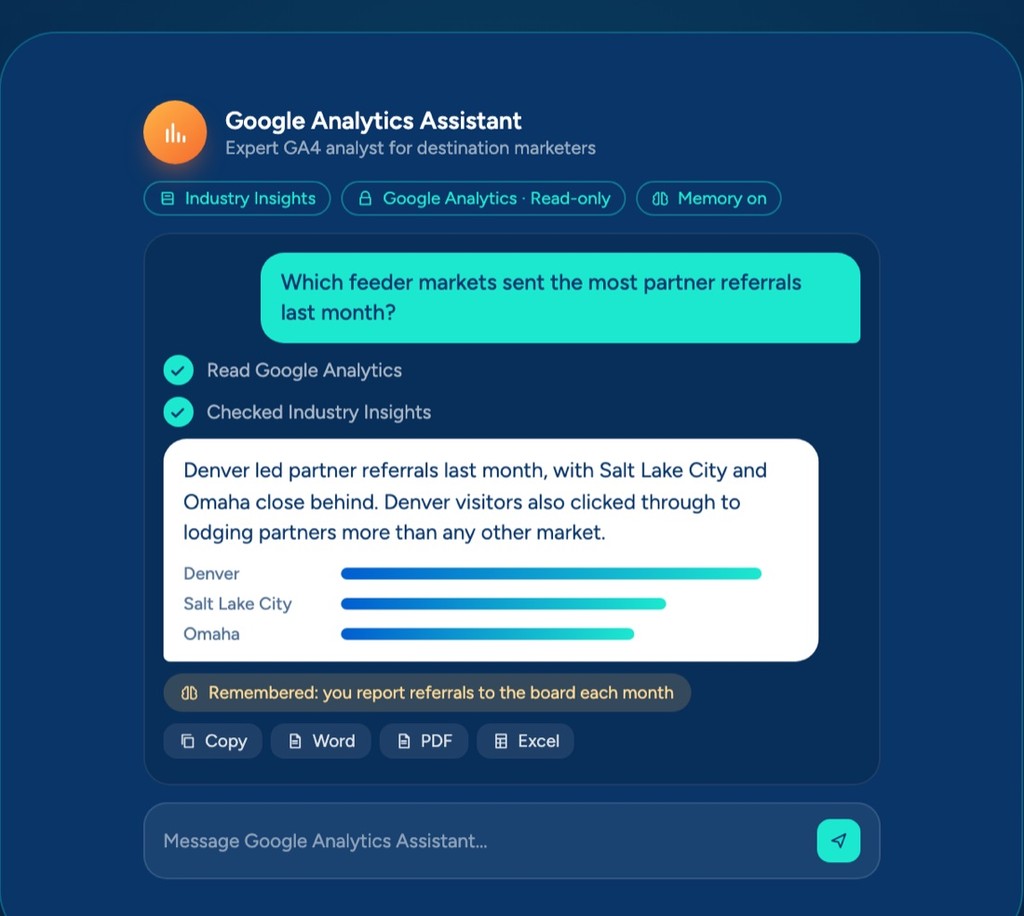 AssistantsAnswers from your Google Analytics, with read-only access.
 ChatOne prompt, a finished board report you can share.
 AI knowledge baseYour files, read by every assistant, agent and flow.
Swix AI
- Reading the inbox
- Drafting RFP replies
- Updating partner listings
- Agents on shift
- Swix
- AI
- Open
Home
AI knowledge base
One library your assistants, agents and flows read from, so answers come from the files you've approved.
Private to your workspace until you choose to share it, and connected folders keep it current as your files change.
What a knowledge base is, and why it matters
A knowledge base is a set of files your team trusts, kept where Swix can read them. Think brand guide, partner list, event details and board reports. Instead of re-explaining your destination every time, your assistants, agents and flows look it up, so what they write sounds like you and gets the facts right.
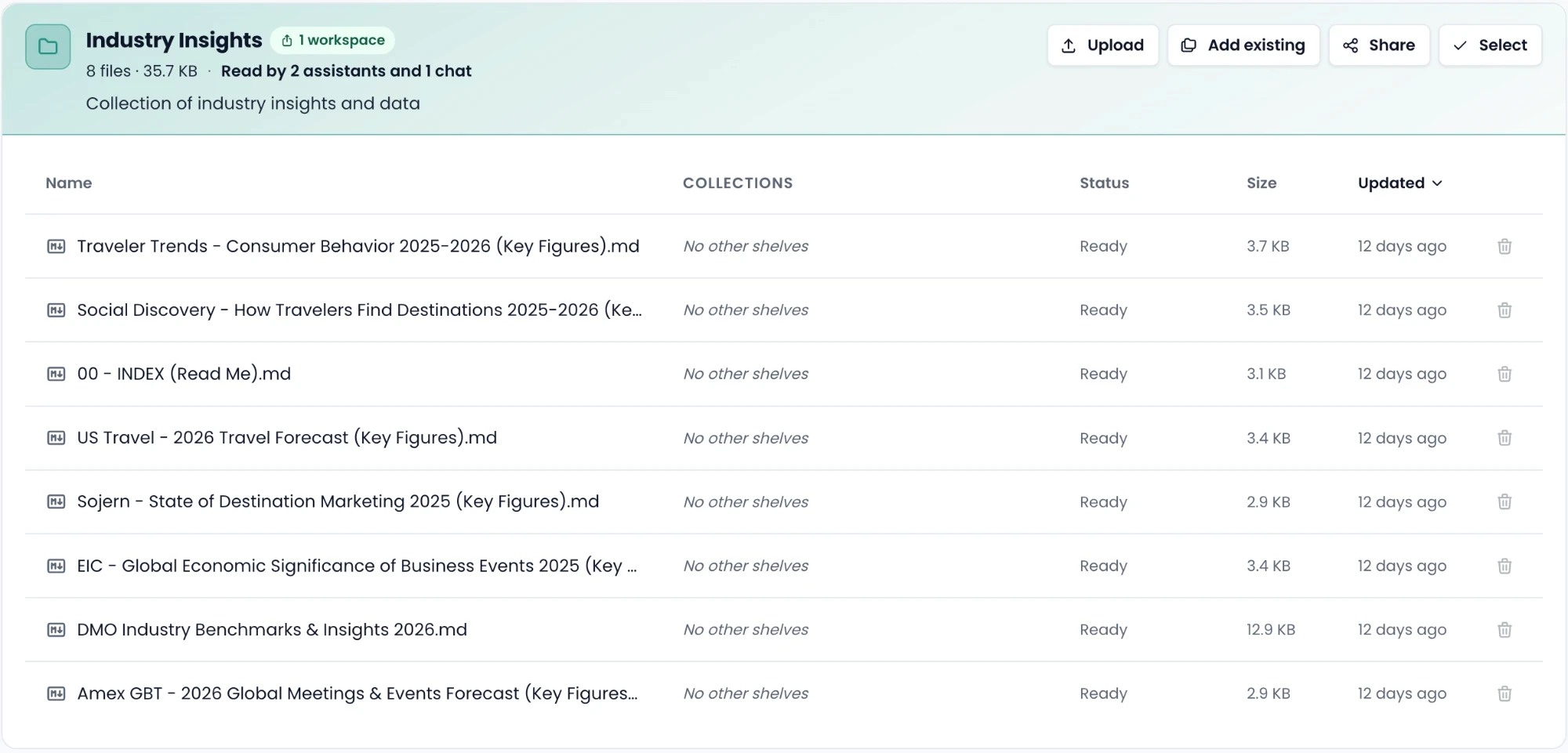
How it works
- 01
Pick the files your team trusts
- 02
Connect your Drive or upload them
- 03
Sort them into collections
- 04
Point your assistants and agents at them
What's included
- Uploads of PDFs, Word, Excel and slides
- Synced folders from Drive, OneDrive and Dropbox
- Collections you control
- Answers tagged with the page or sheet they came from
- Sharing between workspaces when you choose
Works with
Our tone, approved messaging, logo rules and the words we never use.
Every event this year with dates, venues, sponsors and run of show.
Member businesses, contacts, renewal dates and listing details.
AI knowledge base
One library your assistants, agents and flows read from, so answers come from the files you've approved.
Private to your workspace until you choose to share it, and connected folders keep it current as your files change.
What a knowledge base is, and why it matters
A knowledge base is a set of files your team trusts, kept where Swix can read them. Think brand guide, partner list, event details and board reports. Instead of re-explaining your destination every time, your assistants, agents and flows look it up, so what they write sounds like you and gets the facts right.
How it works
- 01
Pick the files your team trusts
- 02
Connect your Drive or upload them
- 03
Sort them into collections
- 04
Point your assistants and agents at them
What's included
- Uploads of PDFs, Word, Excel and slides
- Synced folders from Drive, OneDrive and Dropbox
- Collections you control
- Answers tagged with the page or sheet they came from
- Sharing between workspaces when you choose
Works with
Our tone, approved messaging, logo rules and the words we never use.
Every event this year with dates, venues, sponsors and run of show.
Member businesses, contacts, renewal dates and listing details.
AI knowledge base
One library your assistants, agents and flows read from, so answers come from the files you've approved.
Private to your workspace until you choose to share it, and connected folders keep it current as your files change.
What a knowledge base is, and why it matters
A knowledge base is a set of files your team trusts, kept where Swix can read them. Think brand guide, partner list, event details and board reports. Instead of re-explaining your destination every time, your assistants, agents and flows look it up, so what they write sounds like you and gets the facts right.
How it works
- 01
Pick the files your team trusts
- 02
Connect your Drive or upload them
- 03
Sort them into collections
- 04
Point your assistants and agents at them
What's included
- Uploads of PDFs, Word, Excel and slides
- Synced folders from Drive, OneDrive and Dropbox
- Collections you control
- Answers tagged with the page or sheet they came from
- Sharing between workspaces when you choose
Works with
Our tone, approved messaging, logo rules and the words we never use.
Every event this year with dates, venues, sponsors and run of show.
Member businesses, contacts, renewal dates and listing details.
Book a demo
Ready when you are.
Tell us where the hours go. We'll show you Swix working on your destination's real work, and what your first 60 days would look like.
No slides. No obligation.
Book a demo
Ready when you are.
Tell us where the hours go. We'll show you Swix working on your destination's real work, and what your first 60 days would look like.
No slides. No obligation.