
Inside Swix AI
- FeaturesChat, assistants, automations and agents, built for destination teams.
- Agents (AI Workforce)An agent team that plans the work, does it, and checks in when a person has to decide.
- AI AutomationsQuickFlows, ActionFlows and SmartFlows for the work you repeat.
- AssistantsCustom assistants that know your role, your files and your voice.
- ChatAsk in plain words, get back reports, decks and dashboards.
- AI knowledge baseOne library of your files that everything in Swix reads from.
- Security & TrustHow your data is encrypted, isolated and never used to train outside AI models.
 In their words30 min“What used to take me hours now takes me 30 minutes tops.”Jenna McCormick · Destination Creative & Content Manager, Visit Cheyenne
 AgentsPlans the work, does it, and stops for your okay.
 AI AutomationsA monthly board report, drafted in five numbered steps.
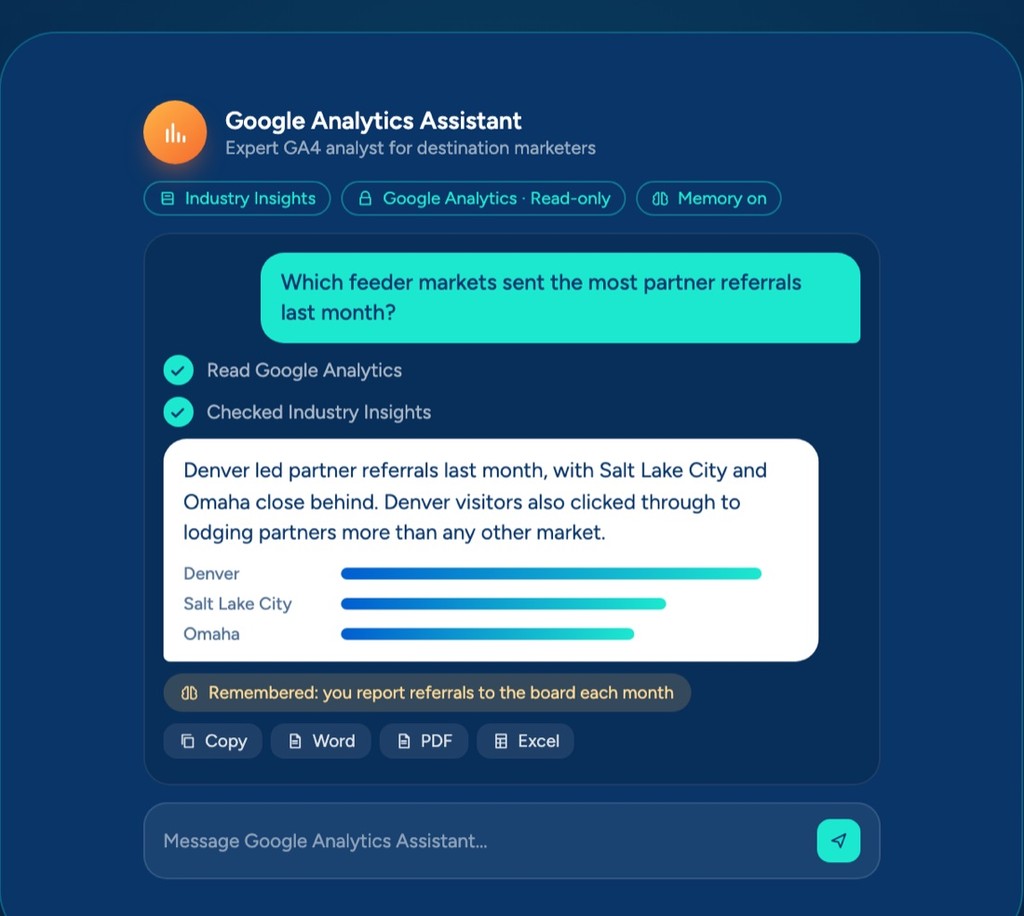 AssistantsAnswers from your Google Analytics, with read-only access.
 ChatOne prompt, a finished board report you can share.
 AI knowledge baseYour files, read by every assistant, agent and flow.
Swix AI
- Reading the inbox
- Drafting RFP replies
- Updating partner listings
- Agents on shift
- Swix
- AI
- Open
Home
AI Workflow Automations
Set up a task once and Swix runs it the same way every time, whether it's a quick social post or the monthly board report.
- 1Ask for the month and the highlightsGet User InputSeptember · two new sports events, hotel tax trend
- 2Upload this month's numbersGet User FileKPI_Dashboard_September.xlsx
- 3Read the strategic plan and last reportKnowledge BaseStrategic Plan 2026 · Board Report, August
- 4Draft the narrative by strategic pillarGenerate Content
- 5Save it as a doc, ready to editSave to Google Doc
Start with the simplest flow that does the job, and move it up a step when the task outgrows it.
Three kinds of flows, each a step up from the last
QuickFlowThe smart form
Fill in a few boxes, click go, and it writes the result right back. Set it up once and anyone on your team can run it in a couple of clicks.
Good forA tourism trend briefing, social posts in your brand voice, a first email to a meeting planner, a follow-up nudge to a hotel
Lean into wildlife watching as a premium adventure product.
ActionFlowThe assembly line
Numbered steps that run in the same order every time, each one handing its result to the next. It can start on a schedule or when something happens in your apps, and it can read a sheet, search your files and save a draft where you work.
Good forThe board report narrative, a full event playbook from a short description, a batch of donation tax letters from a donor sheet
SmartFlowThe decision maker
Built on a visual canvas, so the work doesn't have to run in a straight line. It goes through a list one item at a time, treats each one differently and stops for your okay before it finishes.
Good forFinding new meeting leads for your sales team, the monthly events calendar, post-event survey analysis, cleaning up a contact import
Not sure which one you need?
- 1Could a QuickFlow do it? If you just need a few answers in and something written back, you're done. A lot of tasks stop here.
- 2If not, could an ActionFlow? Pick it when the job needs your apps, a few steps or a schedule.
- 3If not, it's a SmartFlow. Reach for it when the work goes through a list, makes choices or needs your okay partway.
Torn between two? Pick the simpler one. You can rebuild it as the bigger type later, so there's no wrong choice.
You don't start from a blank page
How it works
- 01
Pick one task your team repeats every week
- 02
Describe it in plain words and Swix drafts the flow
- 03
Connect the apps it needs to reach
- 04
Run it, check the result, then let it run on its own
What's included
- Three kinds of flows, from a one-click task to a multi-step job
- Templates to start from, sorted by team
- Runs on a schedule or when something happens in your apps
- In SmartFlows, work waits for your okay before it goes out
- Every run logged, step by step
Works with
AI Workflow Automations
Set up a task once and Swix runs it the same way every time, whether it's a quick social post or the monthly board report.
- 1Ask for the month and the highlightsGet User InputSeptember · two new sports events, hotel tax trend
- 2Upload this month's numbersGet User FileKPI_Dashboard_September.xlsx
- 3Read the strategic plan and last reportKnowledge BaseStrategic Plan 2026 · Board Report, August
- 4Draft the narrative by strategic pillarGenerate Content
- 5Save it as a doc, ready to editSave to Google Doc
Start with the simplest flow that does the job, and move it up a step when the task outgrows it.
Three kinds of flows, each a step up from the last
QuickFlowThe smart form
Fill in a few boxes, click go, and it writes the result right back. Set it up once and anyone on your team can run it in a couple of clicks.
Good forA tourism trend briefing, social posts in your brand voice, a first email to a meeting planner, a follow-up nudge to a hotel
Lean into wildlife watching as a premium adventure product.
ActionFlowThe assembly line
Numbered steps that run in the same order every time, each one handing its result to the next. It can start on a schedule or when something happens in your apps, and it can read a sheet, search your files and save a draft where you work.
Good forThe board report narrative, a full event playbook from a short description, a batch of donation tax letters from a donor sheet
SmartFlowThe decision maker
Built on a visual canvas, so the work doesn't have to run in a straight line. It goes through a list one item at a time, treats each one differently and stops for your okay before it finishes.
Good forFinding new meeting leads for your sales team, the monthly events calendar, post-event survey analysis, cleaning up a contact import
Not sure which one you need?
- 1Could a QuickFlow do it? If you just need a few answers in and something written back, you're done. A lot of tasks stop here.
- 2If not, could an ActionFlow? Pick it when the job needs your apps, a few steps or a schedule.
- 3If not, it's a SmartFlow. Reach for it when the work goes through a list, makes choices or needs your okay partway.
Torn between two? Pick the simpler one. You can rebuild it as the bigger type later, so there's no wrong choice.
You don't start from a blank page
How it works
- 01
Pick one task your team repeats every week
- 02
Describe it in plain words and Swix drafts the flow
- 03
Connect the apps it needs to reach
- 04
Run it, check the result, then let it run on its own
What's included
- Three kinds of flows, from a one-click task to a multi-step job
- Templates to start from, sorted by team
- Runs on a schedule or when something happens in your apps
- In SmartFlows, work waits for your okay before it goes out
- Every run logged, step by step
Works with
AI Workflow Automations
Set up a task once and Swix runs it the same way every time, whether it's a quick social post or the monthly board report.
- 1Ask for the month and the highlightsGet User InputSeptember · two new sports events, hotel tax trend
- 2Upload this month's numbersGet User FileKPI_Dashboard_September.xlsx
- 3Read the strategic plan and last reportKnowledge BaseStrategic Plan 2026 · Board Report, August
- 4Draft the narrative by strategic pillarGenerate Content
- 5Save it as a doc, ready to editSave to Google Doc
Start with the simplest flow that does the job, and move it up a step when the task outgrows it.
Three kinds of flows, each a step up from the last
QuickFlowThe smart form
Fill in a few boxes, click go, and it writes the result right back. Set it up once and anyone on your team can run it in a couple of clicks.
Good forA tourism trend briefing, social posts in your brand voice, a first email to a meeting planner, a follow-up nudge to a hotel
Lean into wildlife watching as a premium adventure product.
ActionFlowThe assembly line
Numbered steps that run in the same order every time, each one handing its result to the next. It can start on a schedule or when something happens in your apps, and it can read a sheet, search your files and save a draft where you work.
Good forThe board report narrative, a full event playbook from a short description, a batch of donation tax letters from a donor sheet
SmartFlowThe decision maker
Built on a visual canvas, so the work doesn't have to run in a straight line. It goes through a list one item at a time, treats each one differently and stops for your okay before it finishes.
Good forFinding new meeting leads for your sales team, the monthly events calendar, post-event survey analysis, cleaning up a contact import
Not sure which one you need?
- 1Could a QuickFlow do it? If you just need a few answers in and something written back, you're done. A lot of tasks stop here.
- 2If not, could an ActionFlow? Pick it when the job needs your apps, a few steps or a schedule.
- 3If not, it's a SmartFlow. Reach for it when the work goes through a list, makes choices or needs your okay partway.
Torn between two? Pick the simpler one. You can rebuild it as the bigger type later, so there's no wrong choice.
You don't start from a blank page
How it works
- 01
Pick one task your team repeats every week
- 02
Describe it in plain words and Swix drafts the flow
- 03
Connect the apps it needs to reach
- 04
Run it, check the result, then let it run on its own
What's included
- Three kinds of flows, from a one-click task to a multi-step job
- Templates to start from, sorted by team
- Runs on a schedule or when something happens in your apps
- In SmartFlows, work waits for your okay before it goes out
- Every run logged, step by step
Works with
Book a demo
Ready when you are.
Tell us where the hours go. We'll show you Swix working on your destination's real work, and what your first 60 days would look like.
No slides. No obligation.
Book a demo
Ready when you are.
Tell us where the hours go. We'll show you Swix working on your destination's real work, and what your first 60 days would look like.
No slides. No obligation.