
Inside Swix AI
- FeaturesChat, assistants, automations and agents, built for destination teams.
- Agents (AI Workforce)An agent team that plans the work, does it, and checks in when a person has to decide.
- AI AutomationsQuickFlows, ActionFlows and SmartFlows for the work you repeat.
- AssistantsCustom assistants that know your role, your files and your voice.
- ChatAsk in plain words, get back reports, decks and dashboards.
- AI knowledge baseOne library of your files that everything in Swix reads from.
- Security & TrustHow your data is encrypted, isolated and never used to train outside AI models.
 In their words30 min“What used to take me hours now takes me 30 minutes tops.”Jenna McCormick · Destination Creative & Content Manager, Visit Cheyenne
 AgentsPlans the work, does it, and stops for your okay.
 AI AutomationsA monthly board report, drafted in five numbered steps.
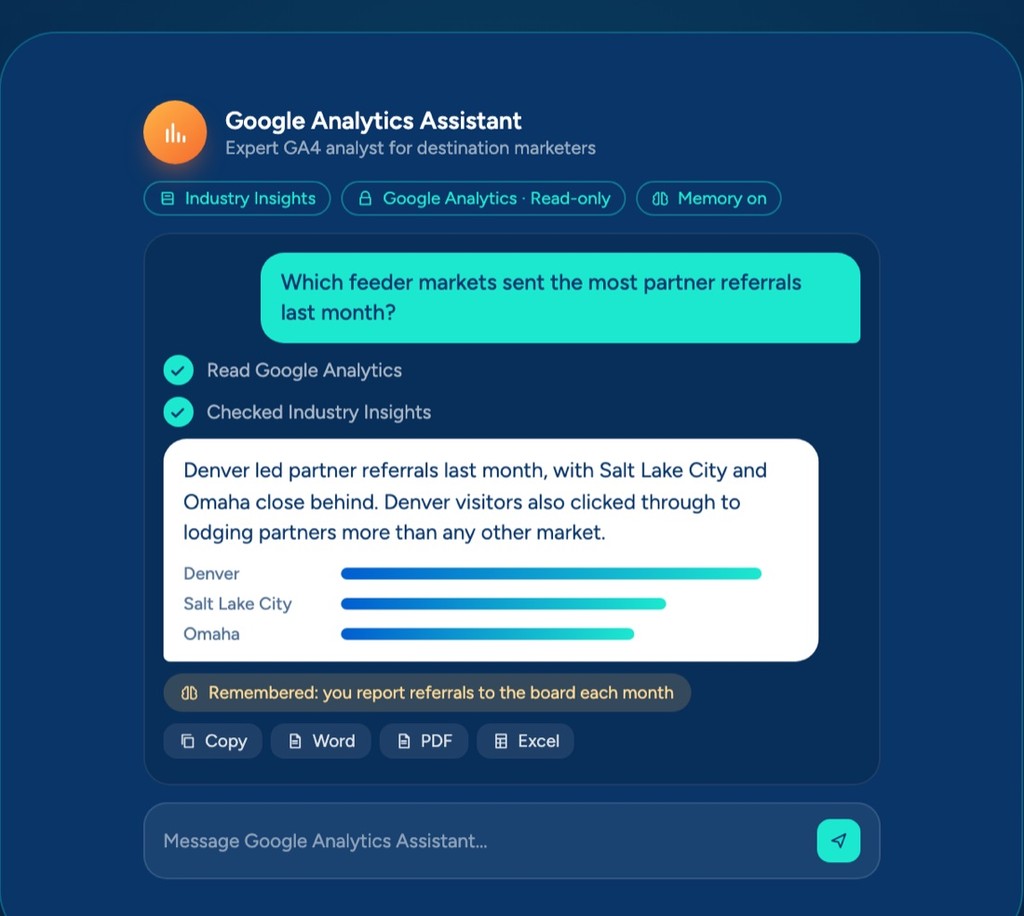 AssistantsAnswers from your Google Analytics, with read-only access.
 ChatOne prompt, a finished board report you can share.
 AI knowledge baseYour files, read by every assistant, agent and flow.
Swix AI
- Reading the inbox
- Drafting RFP replies
- Updating partner listings
- Agents on shift
- Swix
- AI
- Open
Home
Your launch
Up and running in 60 days.
Your team can start using chat within minutes of logging in. Over the 60-Day Launch we learn how your team works, set everything up, build your first automations with you and train everyone, so real work is running on Swix by the end of month two.
- 60 days
- to a working platform
- 5 steps
- from discovery to hand off
- Everyone
- trained, whatever your team size
Your launch
Up and running in 60 days.
Your team can start using chat within minutes of logging in. Over the 60-Day Launch we learn how your team works, set everything up, build your first automations with you and train everyone, so real work is running on Swix by the end of month two.
- 60 days
- to a working platform
- 5 steps
- from discovery to hand off
- Everyone
- trained, whatever your team size
Your 60-Day Launch
Five steps to a platform that works.
01
Day 1
Discovery
We sit down with each team, learn how their week really runs, and rank the work AI can take off their plate. You come away with a clear plan for what we build first.
Team interviewsRanked opportunitiesYour build plan
02
Step 2
Set up
We set up your account, connect the tools you already use, and load your reports, website and guides, so Swix knows your destination from the start.
Account and adminTools connectedKnowledge loaded
03
Step 3
Build together
We watch real work with your real files, then build your first automations side by side with your team and test them on your own examples.
Your first automationsTested on real work
04
Step 4
Train
Your hands-on group learns to build and run things themselves. Everyone else at your organization gets group training, no matter how big your team is.
Hands-on trainingGroup training for everyone
05
Day 60
Hand off
You take over a platform that's already working, with your first wins in hand and a short list of what to build next.
A working platformWhat to build next
After day 60, your choice
- Optional
Managed services
We keep building new automations for you and look after everything we built, so your team can just use it.
- Optional
Prepaid support
Hours you use whenever you need them, for a new build, a fix or a second pair of hands.
Your 60-Day Launch
Five steps to a platform that works.
01
Day 1
Discovery
We sit down with each team, learn how their week really runs, and rank the work AI can take off their plate. You come away with a clear plan for what we build first.
Team interviewsRanked opportunitiesYour build plan
02
Step 2
Set up
We set up your account, connect the tools you already use, and load your reports, website and guides, so Swix knows your destination from the start.
Account and adminTools connectedKnowledge loaded
03
Step 3
Build together
We watch real work with your real files, then build your first automations side by side with your team and test them on your own examples.
Your first automationsTested on real work
04
Step 4
Train
Your hands-on group learns to build and run things themselves. Everyone else at your organization gets group training, no matter how big your team is.
Hands-on trainingGroup training for everyone
05
Day 60
Hand off
You take over a platform that's already working, with your first wins in hand and a short list of what to build next.
A working platformWhat to build next
After day 60, your choice
- Optional
Managed services
We keep building new automations for you and look after everything we built, so your team can just use it.
- Optional
Prepaid support
Hours you use whenever you need them, for a new build, a fix or a second pair of hands.
- What will we have on day 60?
- A platform that's set up and connected to your tools, your documents and information loaded, your first automations working on real tasks, and a team that knows how to use it. If they're part of your launch, your AI agents and Swix IQ are set up too.
- Who on our team needs to be involved?
- A small hands-on group works with us through discovery, the build and training. Everyone else at your organization gets group training, no matter how big your team is.
- Can more people get hands-on training?
- Yes. You can add more people and more automations to your launch. Let us know and we'll work it in.
- Can you train our team in person?
- Yes. If you'd rather have us in the room, we offer onsite training as part of your launch.
- What happens after day 60?
- That's up to you. With managed services we keep building new automations and look after everything we built. Prepaid support gives you hours to use whenever you need them. Or you run it yourself, and if something we built isn't working as delivered, fixing it is on us.
- Is there anything you never charge for?
- Yes. There are no per-person fees, so your whole team is included. There are no storage fees. Fixing something we built is free. And AI usage is passed through at cost, with no markup.
Questions
Before you start.
The things teams ask us most before their launch. Pick a question to see the answer.
What will we have on day 60?
A platform that's set up and connected to your tools, your documents and information loaded, your first automations working on real tasks, and a team that knows how to use it. If they're part of your launch, your AI agents and Swix IQ are set up too.
- What will we have on day 60?
- A platform that's set up and connected to your tools, your documents and information loaded, your first automations working on real tasks, and a team that knows how to use it. If they're part of your launch, your AI agents and Swix IQ are set up too.
- Who on our team needs to be involved?
- A small hands-on group works with us through discovery, the build and training. Everyone else at your organization gets group training, no matter how big your team is.
- Can more people get hands-on training?
- Yes. You can add more people and more automations to your launch. Let us know and we'll work it in.
- Can you train our team in person?
- Yes. If you'd rather have us in the room, we offer onsite training as part of your launch.
- What happens after day 60?
- That's up to you. With managed services we keep building new automations and look after everything we built. Prepaid support gives you hours to use whenever you need them. Or you run it yourself, and if something we built isn't working as delivered, fixing it is on us.
Questions
Before you start.
The things teams ask us most before their launch. Pick a question to see the answer.
What will we have on day 60?
A platform that's set up and connected to your tools, your documents and information loaded, your first automations working on real tasks, and a team that knows how to use it. If they're part of your launch, your AI agents and Swix IQ are set up too.
Book a demo
Ready when you are.
Tell us where the hours go. We'll show you Swix working on your destination's real work, and what your first 60 days would look like.
No slides. No obligation.
Book a demo
Ready when you are.
Tell us where the hours go. We'll show you Swix working on your destination's real work, and what your first 60 days would look like.
No slides. No obligation.