

Inside Swix AI
- FeaturesChat, assistants, automations and agents, built for destination teams.
- Agents (AI Workforce)An agent team that plans the work, does it, and checks in when a person has to decide.
- AI AutomationsQuickFlows, ActionFlows and SmartFlows for the work you repeat.
- AssistantsCustom assistants that know your role, your files and your voice.
- ChatAsk in plain words, get back reports, decks and dashboards.
- AI knowledge baseOne library of your files that everything in Swix reads from.
- Security & TrustHow your data is encrypted, isolated and never used to train outside AI models.
 In their words30 min“What used to take me hours now takes me 30 minutes tops.”Jenna McCormick · Destination Creative & Content Manager, Visit Cheyenne
 AgentsPlans the work, does it, and stops for your okay.
 AI AutomationsA monthly board report, drafted in five numbered steps.
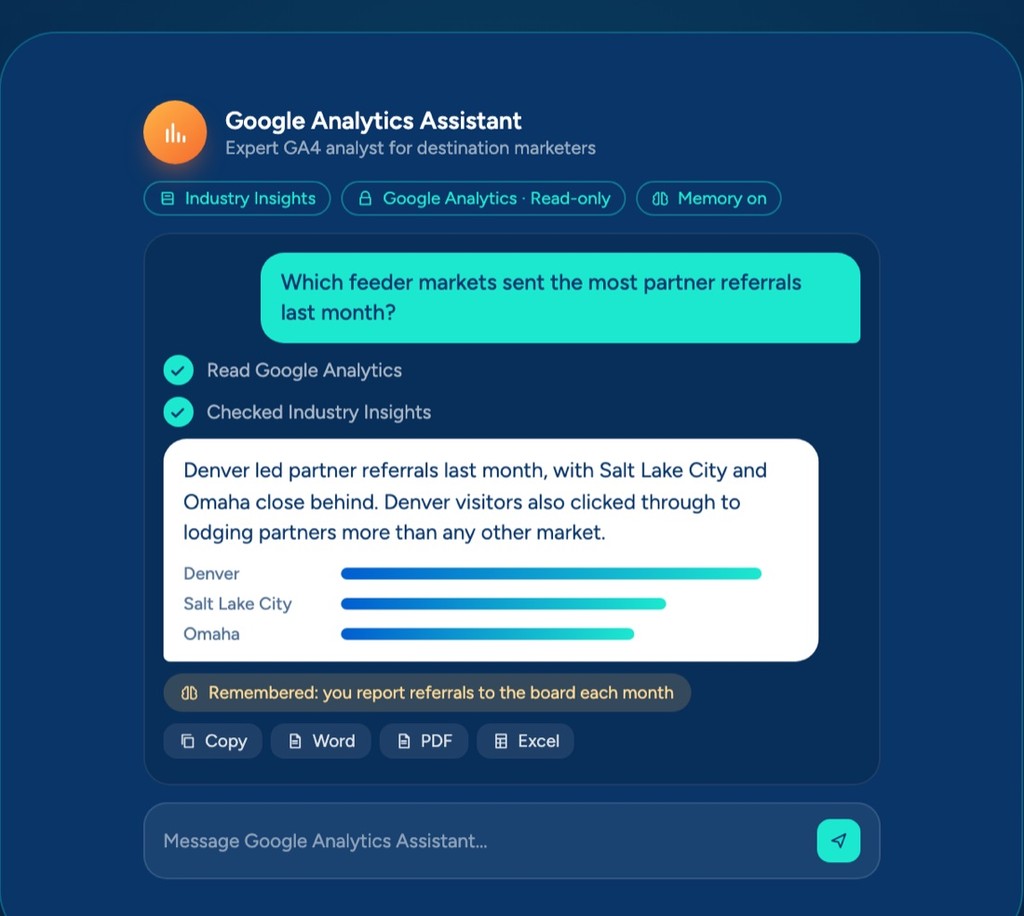 AssistantsAnswers from your Google Analytics, with read-only access.
 ChatOne prompt, a finished board report you can share.
 AI knowledge baseYour files, read by every assistant, agent and flow.
Swix AI
- Reading the inbox
- Drafting RFP replies
- Updating partner listings
- Agents on shift
- Swix
- AI
- Open
Home
BlogOct 8, 2026 · 6 min
The AI That Keeps Working After You Log Off
The big labs just made "always on" the headline feature. The quieter news for a DMO is that you can already use it.

Key takeaways
- The big AI labs are all building assistants that keep working after you close your laptop, not just smarter chatbots.
- What makes an assistant useful to a DMO is what it can see and reach, like your inbox, calendar, CRM and files.
- Connecting those pieces used to happen in someone's head. An agent can now do it on a schedule, like a Monday grant and co-op watch.
- Start with one weekly task that spans a few apps and let an agent connect it once.
We set up an ongoing agent task recently for a client we work with. It runs on its own every Monday morning, scans the tourism grants and co-op programs open right now, pulls out the ones that fit that destination, flags what closes this month, and drops a short list into her inbox. Every item links to a real source, and anything the agent couldn't confirm is left off on purpose.
Nobody had to go looking for it. It ran over the weekend, checked the funders, and had the list ready by Monday.
That matters more than it sounds, because grant money is real money some DMOs leave on the table. Not because they don't want it, but because finding it means someone remembering to check a dozen state, federal, and regional sites every week. Nobody has that kind of time, so deadlines quietly pass. A short, sourced list showing up on its own is the difference between chasing funding and just reviewing it.
That little grant watch is one small piece of a much bigger shift, and if you've been half-watching AI news this fall, you've seen the shape of it. Dots from OpenAI. Grok from SpaceXAI. Muse from Meta.
Grok, dots, bots... it's a lot, I know.
Different companies, same steady drumbeat. Dharmesh Shah wrote about it recently, and reading him I kept thinking about what it means for our side of the world, a destination team instead of a tech startup.
When the biggest labs all ship the same kind of product at once, it's worth asking what they agree on, because they're usually telling you where things are headed.
So let me walk through three things, what these new agents have in common, what changes when yours can connect the pieces, and why this is a good moment for a DMO to try it.
What these agents have in common
They're all chasing the same thing, and it isn't a smarter chatbot. It's an assistant that keeps working after you close the tab.
You give it a goal, it goes off and works while you do something else, and it runs on a computer of its own in the cloud. Because it doesn't need your laptop, the work keeps going after you shut the lid, which is exactly why that grant list could be ready on a Monday without anyone opening a browser. Using one feels less like running software and more like texting a coworker. You send the instructions, they say "on it," and they go do the thing.
People spend a lot of energy arguing about which model is smartest. The model matters, believe me. But what decides whether an assistant is actually useful to you is a smaller, less glamorous question, which is what it can see and reach.
And for most of us, the things it needs to see are scattered everywhere.
If you run marketing for a destination, the full picture of your week lives in a dozen places. Your inbox has the partner threads. Your calendar has where you were and who you met. Your CRM has the accounts. The event history sits in a spreadsheet built by someone who's no longer with the organization. The board report pulls a little from all of it.
Before AI, the only place those pieces ever got connected was in your head. Or your coordinator's head, which is worse, because then it walks out the door the day they take a new job.
Collecting versus connecting
I think about it like this. You spend part of your career collecting things, the partners, the data, the relationships, the institutional memory. And part of it connecting them. DMOs have done a lot of collecting. The connecting has mostly been left to a person, late on a Thursday, with 10 tabs open. That's the job these assistants are quietly taking off your plate.
What changes when it connects the pieces
The grant watch I shared is one version of this. Here are two more from my own week.
Every weekday at 7:30 a.m., before I'm even at my desk, an email is waiting that pulls my calendar, my inbox, the top industry news I need to read, and my open tasks into one short rundown of what matters that day. I didn't assemble it. It ran on its own, in the cloud, while I was still asleep. Honestly, it started as a novelty I almost ignored. Now it's the first thing I read in the morning.
The other one that stuck was prepping for a partner meeting. I asked for a quick prep, and it pulled the meeting off my Google Calendar, dug the relevant thread out of my Gmail, reviewed my previous meeting notes from Granola, and handed me one page with who I was meeting, what we'd last talked about, and what was still open. Pulling that together used to be fifteen minutes I never had. Better yet, it's great at remembering things I may have forgotten.
Once the pieces are connected, the questions get interesting. Which partners haven't heard from us since the spring. What did we promise the hotel group on that last call. Which events drove the most room nights last year, and what did we spend to get them. None of those sit in one place, and all of them become a plain-English question to an agent instead of an afternoon of digging.
It isn't magic, and I'll admit it's still early. When two sources disagree, it doesn't always know which one to trust. That's exactly why the grant watch only lists what it can verify from a real source and drops what it can't, because the fastest way to lose a board's trust is to hand them a grant that closed last month.
Where Swix already does this
So here's the part that matters if you're a DMO wondering whether any of this is real for you yet. It is, and you don't need one of the new consumer apps to get it.
This is what we built Swix AI to do. The agent runs on our servers, not your machine, so a task you hand it keeps running after you close your laptop, and that Monday list shows up whether or not anyone logged in over the weekend. It works inside many of the tools your team already uses, with your permission, so it can see the real context instead of guessing at it.
The piece we're finishing now is the tap on the shoulder, so when a job wraps or needs your sign-off while you're away, it reaches you instead of waiting for you to come back and check. That part is already in development. The rest is working today.
Why this is the moment to try it
Assistants like this aren't a brand new idea. What's new is that the floor got low enough for the rest of us. Not long ago, running your own always-on agent meant standing up software on a spare laptop (crazy that people did this), which appealed to about four people. Now it's a chat window, and the biggest labs are racing to build the consumer version. We're building the DMO version.
If you've been waiting for the right moment to actually try this, as a beginner or as someone who's been poking at AI for a while, I think this is it. Pick one thing you do every week that lives across a few apps, the grant check, the Monday rollup, the meeting prep, and let something connect those pieces once. You may be surprised by what it hands back.
-Jason
We build AI tools made specifically for DMOs at Swix AI. If any of this resonates and you want to see what it looks like in practice, I'm happy to show you.
Questions people ask
What is an always-on AI agent?
It's an assistant that runs on its own computer in the cloud, so a task you hand it keeps going after you close the tab or shut your laptop. You give it a goal, it works while you do something else, and it reports back.
How can a DMO use an always-on AI agent?
Start with weekly work that pulls from several places. A grant and co-op funding watch, a morning rundown of your calendar and inbox, or a one-page brief before a partner meeting are all good first tasks.
Can an AI agent be trusted to track grant deadlines?
Only if it shows its sources. The grant watch in this post lists only programs it can verify from a real source and leaves off anything it can't confirm, because handing a board a grant that already closed is the fastest way to lose their trust.
Does Swix AI do this today?
Yes. Swix AI runs agents on our own servers, so scheduled work keeps going when nobody is logged in, and it works inside many of the tools your team already uses, with your permission.
BlogOct 8, 2026 · 6 min
The big labs just made "always on" the headline feature. The quieter news for a DMO is that you can already use it.
Key takeaways
- The big AI labs are all building assistants that keep working after you close your laptop, not just smarter chatbots.
- What makes an assistant useful to a DMO is what it can see and reach, like your inbox, calendar, CRM and files.
- Connecting those pieces used to happen in someone's head. An agent can now do it on a schedule, like a Monday grant and co-op watch.
- Start with one weekly task that spans a few apps and let an agent connect it once.
We set up an ongoing agent task recently for a client we work with. It runs on its own every Monday morning, scans the tourism grants and co-op programs open right now, pulls out the ones that fit that destination, flags what closes this month, and drops a short list into her inbox. Every item links to a real source, and anything the agent couldn't confirm is left off on purpose.
Nobody had to go looking for it. It ran over the weekend, checked the funders, and had the list ready by Monday.
That matters more than it sounds, because grant money is real money some DMOs leave on the table. Not because they don't want it, but because finding it means someone remembering to check a dozen state, federal, and regional sites every week. Nobody has that kind of time, so deadlines quietly pass. A short, sourced list showing up on its own is the difference between chasing funding and just reviewing it.
That little grant watch is one small piece of a much bigger shift, and if you've been half-watching AI news this fall, you've seen the shape of it. Dots from OpenAI. Grok from SpaceXAI. Muse from Meta.
Grok, dots, bots... it's a lot, I know.
Different companies, same steady drumbeat. Dharmesh Shah wrote about it recently, and reading him I kept thinking about what it means for our side of the world, a destination team instead of a tech startup.
When the biggest labs all ship the same kind of product at once, it's worth asking what they agree on, because they're usually telling you where things are headed.
So let me walk through three things, what these new agents have in common, what changes when yours can connect the pieces, and why this is a good moment for a DMO to try it.
What these agents have in common
They're all chasing the same thing, and it isn't a smarter chatbot. It's an assistant that keeps working after you close the tab.
You give it a goal, it goes off and works while you do something else, and it runs on a computer of its own in the cloud. Because it doesn't need your laptop, the work keeps going after you shut the lid, which is exactly why that grant list could be ready on a Monday without anyone opening a browser. Using one feels less like running software and more like texting a coworker. You send the instructions, they say "on it," and they go do the thing.
People spend a lot of energy arguing about which model is smartest. The model matters, believe me. But what decides whether an assistant is actually useful to you is a smaller, less glamorous question, which is what it can see and reach.
And for most of us, the things it needs to see are scattered everywhere.
If you run marketing for a destination, the full picture of your week lives in a dozen places. Your inbox has the partner threads. Your calendar has where you were and who you met. Your CRM has the accounts. The event history sits in a spreadsheet built by someone who's no longer with the organization. The board report pulls a little from all of it.
Before AI, the only place those pieces ever got connected was in your head. Or your coordinator's head, which is worse, because then it walks out the door the day they take a new job.
Collecting versus connecting
I think about it like this. You spend part of your career collecting things, the partners, the data, the relationships, the institutional memory. And part of it connecting them. DMOs have done a lot of collecting. The connecting has mostly been left to a person, late on a Thursday, with 10 tabs open. That's the job these assistants are quietly taking off your plate.
What changes when it connects the pieces
The grant watch I shared is one version of this. Here are two more from my own week.
Every weekday at 7:30 a.m., before I'm even at my desk, an email is waiting that pulls my calendar, my inbox, the top industry news I need to read, and my open tasks into one short rundown of what matters that day. I didn't assemble it. It ran on its own, in the cloud, while I was still asleep. Honestly, it started as a novelty I almost ignored. Now it's the first thing I read in the morning.
The other one that stuck was prepping for a partner meeting. I asked for a quick prep, and it pulled the meeting off my Google Calendar, dug the relevant thread out of my Gmail, reviewed my previous meeting notes from Granola, and handed me one page with who I was meeting, what we'd last talked about, and what was still open. Pulling that together used to be fifteen minutes I never had. Better yet, it's great at remembering things I may have forgotten.
Once the pieces are connected, the questions get interesting. Which partners haven't heard from us since the spring. What did we promise the hotel group on that last call. Which events drove the most room nights last year, and what did we spend to get them. None of those sit in one place, and all of them become a plain-English question to an agent instead of an afternoon of digging.
It isn't magic, and I'll admit it's still early. When two sources disagree, it doesn't always know which one to trust. That's exactly why the grant watch only lists what it can verify from a real source and drops what it can't, because the fastest way to lose a board's trust is to hand them a grant that closed last month.
Where Swix already does this
So here's the part that matters if you're a DMO wondering whether any of this is real for you yet. It is, and you don't need one of the new consumer apps to get it.
This is what we built Swix AI to do. The agent runs on our servers, not your machine, so a task you hand it keeps running after you close your laptop, and that Monday list shows up whether or not anyone logged in over the weekend. It works inside many of the tools your team already uses, with your permission, so it can see the real context instead of guessing at it.
The piece we're finishing now is the tap on the shoulder, so when a job wraps or needs your sign-off while you're away, it reaches you instead of waiting for you to come back and check. That part is already in development. The rest is working today.
Why this is the moment to try it
Assistants like this aren't a brand new idea. What's new is that the floor got low enough for the rest of us. Not long ago, running your own always-on agent meant standing up software on a spare laptop (crazy that people did this), which appealed to about four people. Now it's a chat window, and the biggest labs are racing to build the consumer version. We're building the DMO version.
If you've been waiting for the right moment to actually try this, as a beginner or as someone who's been poking at AI for a while, I think this is it. Pick one thing you do every week that lives across a few apps, the grant check, the Monday rollup, the meeting prep, and let something connect those pieces once. You may be surprised by what it hands back.
-Jason
We build AI tools made specifically for DMOs at Swix AI. If any of this resonates and you want to see what it looks like in practice, I'm happy to show you.
Questions people ask
What is an always-on AI agent?
It's an assistant that runs on its own computer in the cloud, so a task you hand it keeps going after you close the tab or shut your laptop. You give it a goal, it works while you do something else, and it reports back.
How can a DMO use an always-on AI agent?
Start with weekly work that pulls from several places. A grant and co-op funding watch, a morning rundown of your calendar and inbox, or a one-page brief before a partner meeting are all good first tasks.
Can an AI agent be trusted to track grant deadlines?
Only if it shows its sources. The grant watch in this post lists only programs it can verify from a real source and leaves off anything it can't confirm, because handing a board a grant that already closed is the fastest way to lose their trust.
Does Swix AI do this today?
Yes. Swix AI runs agents on our own servers, so scheduled work keeps going when nobody is logged in, and it works inside many of the tools your team already uses, with your permission.
BlogOct 8, 2026 · 6 min
The big labs just made "always on" the headline feature. The quieter news for a DMO is that you can already use it.
Key takeaways
- The big AI labs are all building assistants that keep working after you close your laptop, not just smarter chatbots.
- What makes an assistant useful to a DMO is what it can see and reach, like your inbox, calendar, CRM and files.
- Connecting those pieces used to happen in someone's head. An agent can now do it on a schedule, like a Monday grant and co-op watch.
- Start with one weekly task that spans a few apps and let an agent connect it once.
We set up an ongoing agent task recently for a client we work with. It runs on its own every Monday morning, scans the tourism grants and co-op programs open right now, pulls out the ones that fit that destination, flags what closes this month, and drops a short list into her inbox. Every item links to a real source, and anything the agent couldn't confirm is left off on purpose.
Nobody had to go looking for it. It ran over the weekend, checked the funders, and had the list ready by Monday.
That matters more than it sounds, because grant money is real money some DMOs leave on the table. Not because they don't want it, but because finding it means someone remembering to check a dozen state, federal, and regional sites every week. Nobody has that kind of time, so deadlines quietly pass. A short, sourced list showing up on its own is the difference between chasing funding and just reviewing it.
That little grant watch is one small piece of a much bigger shift, and if you've been half-watching AI news this fall, you've seen the shape of it. Dots from OpenAI. Grok from SpaceXAI. Muse from Meta.
Grok, dots, bots... it's a lot, I know.
Different companies, same steady drumbeat. Dharmesh Shah wrote about it recently, and reading him I kept thinking about what it means for our side of the world, a destination team instead of a tech startup.
When the biggest labs all ship the same kind of product at once, it's worth asking what they agree on, because they're usually telling you where things are headed.
So let me walk through three things, what these new agents have in common, what changes when yours can connect the pieces, and why this is a good moment for a DMO to try it.
What these agents have in common
They're all chasing the same thing, and it isn't a smarter chatbot. It's an assistant that keeps working after you close the tab.
You give it a goal, it goes off and works while you do something else, and it runs on a computer of its own in the cloud. Because it doesn't need your laptop, the work keeps going after you shut the lid, which is exactly why that grant list could be ready on a Monday without anyone opening a browser. Using one feels less like running software and more like texting a coworker. You send the instructions, they say "on it," and they go do the thing.
People spend a lot of energy arguing about which model is smartest. The model matters, believe me. But what decides whether an assistant is actually useful to you is a smaller, less glamorous question, which is what it can see and reach.
And for most of us, the things it needs to see are scattered everywhere.
If you run marketing for a destination, the full picture of your week lives in a dozen places. Your inbox has the partner threads. Your calendar has where you were and who you met. Your CRM has the accounts. The event history sits in a spreadsheet built by someone who's no longer with the organization. The board report pulls a little from all of it.
Before AI, the only place those pieces ever got connected was in your head. Or your coordinator's head, which is worse, because then it walks out the door the day they take a new job.
Collecting versus connecting
I think about it like this. You spend part of your career collecting things, the partners, the data, the relationships, the institutional memory. And part of it connecting them. DMOs have done a lot of collecting. The connecting has mostly been left to a person, late on a Thursday, with 10 tabs open. That's the job these assistants are quietly taking off your plate.
What changes when it connects the pieces
The grant watch I shared is one version of this. Here are two more from my own week.
Every weekday at 7:30 a.m., before I'm even at my desk, an email is waiting that pulls my calendar, my inbox, the top industry news I need to read, and my open tasks into one short rundown of what matters that day. I didn't assemble it. It ran on its own, in the cloud, while I was still asleep. Honestly, it started as a novelty I almost ignored. Now it's the first thing I read in the morning.
The other one that stuck was prepping for a partner meeting. I asked for a quick prep, and it pulled the meeting off my Google Calendar, dug the relevant thread out of my Gmail, reviewed my previous meeting notes from Granola, and handed me one page with who I was meeting, what we'd last talked about, and what was still open. Pulling that together used to be fifteen minutes I never had. Better yet, it's great at remembering things I may have forgotten.
Once the pieces are connected, the questions get interesting. Which partners haven't heard from us since the spring. What did we promise the hotel group on that last call. Which events drove the most room nights last year, and what did we spend to get them. None of those sit in one place, and all of them become a plain-English question to an agent instead of an afternoon of digging.
It isn't magic, and I'll admit it's still early. When two sources disagree, it doesn't always know which one to trust. That's exactly why the grant watch only lists what it can verify from a real source and drops what it can't, because the fastest way to lose a board's trust is to hand them a grant that closed last month.
Where Swix already does this
So here's the part that matters if you're a DMO wondering whether any of this is real for you yet. It is, and you don't need one of the new consumer apps to get it.
This is what we built Swix AI to do. The agent runs on our servers, not your machine, so a task you hand it keeps running after you close your laptop, and that Monday list shows up whether or not anyone logged in over the weekend. It works inside many of the tools your team already uses, with your permission, so it can see the real context instead of guessing at it.
The piece we're finishing now is the tap on the shoulder, so when a job wraps or needs your sign-off while you're away, it reaches you instead of waiting for you to come back and check. That part is already in development. The rest is working today.
Why this is the moment to try it
Assistants like this aren't a brand new idea. What's new is that the floor got low enough for the rest of us. Not long ago, running your own always-on agent meant standing up software on a spare laptop (crazy that people did this), which appealed to about four people. Now it's a chat window, and the biggest labs are racing to build the consumer version. We're building the DMO version.
If you've been waiting for the right moment to actually try this, as a beginner or as someone who's been poking at AI for a while, I think this is it. Pick one thing you do every week that lives across a few apps, the grant check, the Monday rollup, the meeting prep, and let something connect those pieces once. You may be surprised by what it hands back.
-Jason
We build AI tools made specifically for DMOs at Swix AI. If any of this resonates and you want to see what it looks like in practice, I'm happy to show you.
Questions people ask
What is an always-on AI agent?
It's an assistant that runs on its own computer in the cloud, so a task you hand it keeps going after you close the tab or shut your laptop. You give it a goal, it works while you do something else, and it reports back.
How can a DMO use an always-on AI agent?
Start with weekly work that pulls from several places. A grant and co-op funding watch, a morning rundown of your calendar and inbox, or a one-page brief before a partner meeting are all good first tasks.
Can an AI agent be trusted to track grant deadlines?
Only if it shows its sources. The grant watch in this post lists only programs it can verify from a real source and leaves off anything it can't confirm, because handing a board a grant that already closed is the fastest way to lose their trust.
Does Swix AI do this today?
Yes. Swix AI runs agents on our own servers, so scheduled work keeps going when nobody is logged in, and it works inside many of the tools your team already uses, with your permission.
Book a demo
Ready when you are.
Tell us where the hours go. We'll show you Swix working on your destination's real work, and what your first 60 days would look like.
No slides. No obligation.
Book a demo
Ready when you are.
Tell us where the hours go. We'll show you Swix working on your destination's real work, and what your first 60 days would look like.
No slides. No obligation.