
Why Many DMO Teams Are Still Stuck on AI — And What Actually Moves the Needle


I've been talking with a consultant who has run AI sessions across roughly 20 DMO teams over the past year. Small groups, intimate sessions, organizations ranging from early-stage to some of the most AI-forward destinations in the country.
His observation stopped me cold.
At nearly every organization, including ones that have had AI tools in place for years, roughly 90% of staff members cannot name the basic elements of a good prompt.
Not because they're not smart. Not because they don't care. Because nobody ever actually taught them.
That's the real adoption gap right now. It's not access to tools. It's that the gap between "we have AI" and "we know how to use AI" is much wider than most leaders realize. And until that gap closes, the tools don't matter much.
What's Actually Happening on the Ground
If you've tried to roll out AI to your team, you've probably seen something like this.
Younger staff aren't resistant. They're already at capacity.
One more tool feels like one more thing to learn on a calendar that has nothing left in it. The resistance isn't philosophical, it's practical. They don't have bandwidth.
Older staff tend toward a different reaction: skepticism.
They've seen technology promises before. They're not sure AI is real, or they're quietly worried about what it means for their jobs. Neither group is wrong, exactly. They're both responding rationally to their situation.
But there's a third pattern that doesn't get talked about enough: apathy.
Not resistance, not fear. Just disengagement. The tools got introduced, nothing about the rollout connected to the actual work those people do every day, and so they tuned out.
That's not a character flaw. It's a predictable response to something that was never made relevant to them.
The result across all three groups is the same: most teams end up using AI for surface-level tasks, polishing emails, maybe drafting a social post, and nothing that actually changes how the work gets done. CEOs have tried introducing tools, forming task forces, bringing in consultants. The plateau is real, and a lot of leaders feel stuck on it.
One thing I've heard consistently, and seen firsthand in our own pilot work: large training sessions rarely move the needle. Neither do videos or open Q&A calls on their own. What actually shifts behavior is small groups of two or three people working through real tasks together. Their actual work, not a demo scenario.
I'll be honest, I've made the same mistake. We handed over the platform and expected teams to run with it. What they actually needed was someone sitting with them, working through their specific tasks, until it clicked. The difference between showing someone a tool and sitting with them while they use it on something they care about is significant. Most rollouts skip that second part. We did too, at first. And part of the reason is that most people, including the people running the rollout, don't have a clear mental model of what these tools actually are or how they work. That's why it helps to start from scratch.
What an Agent Actually Is
Before we get into how to use agents well, it helps to understand what they actually are, because most of the confusion I see comes from people treating them like magic, or like complicated software that requires a technical background.
An agent is simpler than either. It's a set of instructions with a job.
Agents typically have six components:
Role. Who the AI is. "You are a destination marketing specialist who writes in a warm, conversational tone for leisure travelers."
Task. What it's supposed to do. Not "help with content" — something specific, like "write a 150-word Instagram caption" or "draft a response to this meeting planner inquiry."
Context. What you tell it for this specific task. Your audience, your campaign goals, the tone you want, any details relevant to the output you need right now.
Format. What the output should look like. Length, structure, platform, audience. The clearer this is, the less editing you do on the back end.
Knowledge. What it already knows before you say anything. Your brand guidelines, your destination's story, your venue inventory, your past reports. This lives in some sort of a Knowledge Base and it's what separates a generic AI response from one that actually sounds like your organization.
Access to Tools. What the agent can actually do beyond generating text. Can it search the web, read a spreadsheet, log to your CRM, send an email? The tools you give an agent determine how far it can go without a human stepping in.
That's it.
When someone says they "built an agent," what they mostly did was write good instructions across those six areas. The AI isn't doing anything magical. It's reasoning while following a well-structured set of instructions.
Why Your Prompts Are Probably the Problem
Generic output from AI almost always traces back to generic input.
The AI isn't underperforming, it's doing exactly what you asked. You just didn't give it enough to work with. We're three years into AI and this is still something a lot of teams struggle with.
Here's what that looks like in practice.
Weak prompt: "Write a social media post about our fall festival." That tells the AI almost nothing. It doesn't know your destination's voice, your audience, what platform you're posting on, what makes your festival worth showing up for, event nuances, or what action you want someone to take. The output will be generic because the input was generic.
Better prompt: "You are a social media specialist for [Destination Name], a regional DMO. Write a 120-word Instagram caption promoting our Fall Harvest Festival happening October 12-14. The audience is families and couples within a three-hour drive. Our voice is warm, locally rooted, and never corporate. Highlight the live music, farm-to-table dinners, and free kids' activities. End with a soft call to action to visit our website for tickets."
The second prompt takes about 45 seconds longer to write. The output is usable on the first try.
The four elements — role, task, context, format — are worth building into every prompt your team writes.
MIT Sloan has a useful plain-language breakdown of how this works if you want to go deeper. Harvard's IT team put together a practical starter guide that's worth bookmarking too. It's a few years old but still good. And if you want the most comprehensive free resource available for non-technical people, learnprompting.org is a good resource to send your team. 2050.City even has a free and helpful builder you can use right now on their site.
The single most valuable thing your team can do right now isn't necessarily learning a new tool. It's getting better at giving instructions to the tools they already have.
Department-Specific Agents: What This Looks Like Across a DMO
Most teams think about AI as a single tool for the whole organization. The teams getting real results think about it differently — one agent per job, built specifically for that department's recurring work.
Here's what that looks like across a typical DMO structure, along with estimated time savings based on conversations with DMO teams and some of our own agent insights. These will vary depending on your workflows, team size, and how each agent is configured, but the pattern is consistent.
Department | Agent | Task It Replaces | Est. Time Saved |
Sales | Meeting Planner Lead Qualifier | Evaluating and responding to inquiries one at a time | 2-4 hrs/week |
Executive | Board Report Narrative Generator | Pulling data from multiple sources into a formatted narrative | 3-5 hrs/month |
Marketing | Social Media Calendar Generator | Weekly content planning from scratch | 4-6 hrs/week |
Partnerships | FAM Trip Brief Builder | Building trip itineraries and coordination docs manually | 2-4 hrs/trip |
Communications | Press Release Drafter With Approval | Drafting and routing press releases through review | 2-3 hrs/release |
Contracts | RFP Response Engine | Researching and writing RFP responses | 3-6 hrs/proposal |
If you build agents for five departments and each one saves one person just a few hours a week, you're reclaiming the equivalent of a part-time team member, without a hiring process, without a budget request.
For most DMO teams running lean, that's not a small thing.
The One Thing to Do Before Anything Else
Build a context document for your DMO.
Two or three paragraphs: who you are, who you serve, what your team actually does day-to-day, how you talk about your destination, and how you measure success.
Drop that into any AI tool before you start a task. It takes ten minutes to write once and meaningfully changes the quality of everything you get back. Most teams haven't done this yet. It's probably the highest-return single action you can take this week.
What This Looks Like in Practice
Two examples that illustrate the difference between an AI workflow and a true agent.
The first is a board report AI workflow. You upload your monthly data, answer a few questions about the reporting period and any highlights the board should know about, and it produces a structured first draft — executive summary, performance highlights, areas of attention, forward outlook. Same path every time. It's not making decisions. It's handling the blank page problem.
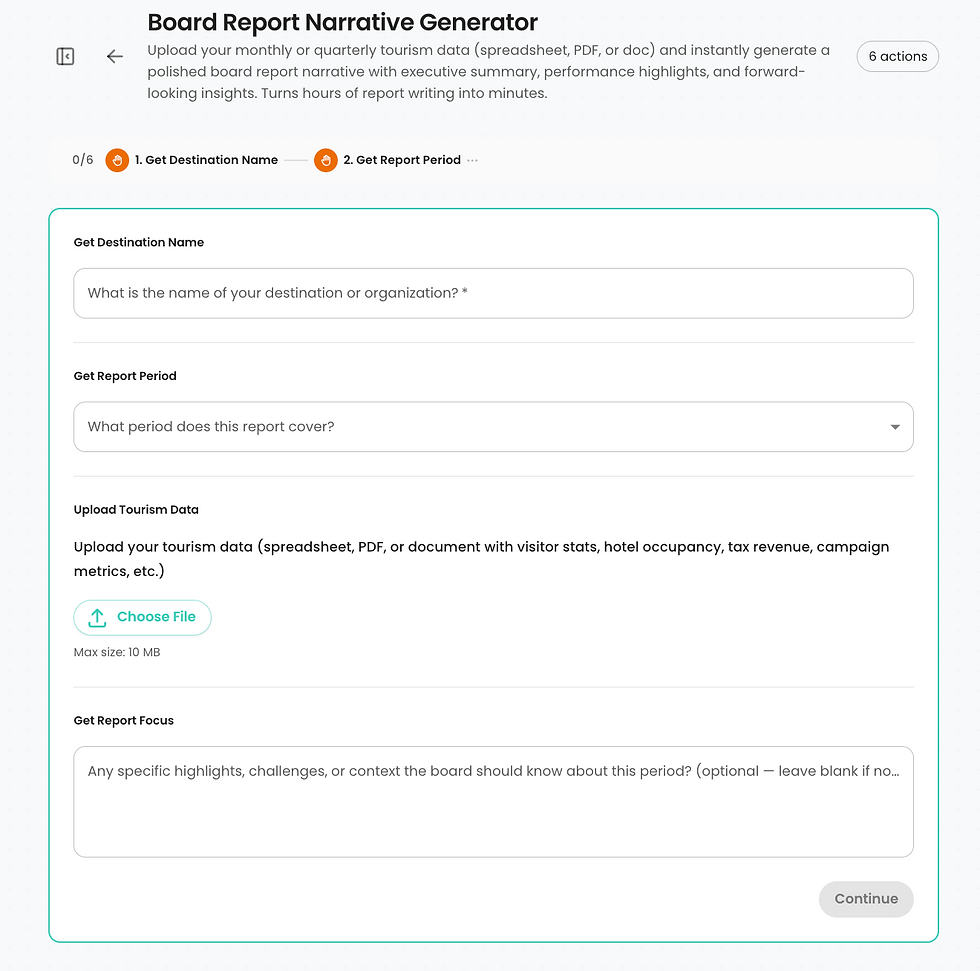
Four fields, a file upload, and your board report narrative is on its way.
The output isn't the final report. You still review it, adjust the framing, add context the data didn't capture. But the two hours of staring at a spreadsheet before a single sentence exists, that part goes away. You're editing instead of writing from scratch, and that's a meaningfully different place to start.
The second is a meeting planner lead qualifier, and this one is an actual agent.
It connects to a lead intake sheet and triggers automatically when a new inquiry comes in. It reads the inquiry, evaluates lead quality, and takes a completely different path depending on what it finds.
Here's what that looks like in practice:

The agent identified a high-value lead from the AIA Florida Chapter and crafted a personalized
VIP response — automatically, before anyone on the sales team opened their inbox.
A 175-person architects conference gets a VIP response that references their specific interests: walkable cultural districts, notable architecture, unique dining, logs the lead to the CRM, and drafts the email in Gmail for the sales team to review before it goes out. A standard inquiry gets a helpful, efficient response. The sales team doesn't triage anymore. They review and send.
That's the difference between a workflow and an agent. One removes a recurring task. The other removes a recurring decision. Both give your team time back for work that actually requires a human.
The short version
AI agents aren't magic. They're instructions. The quality of your instructions determines the quality of your output. Most DMO teams are writing instructions that are too thin to produce anything useful — and then blaming the technology.
The adoption gap isn't a tool problem. It's a habits problem. And habits change in small groups, on real tasks, one workflow at a time.
Start with one agent for one department. Get that right. Then build from there.
More soon.
-Jason
I write about AI and destination marketing for DMO professionals. If you want pieces like this a few days before they go public, you can join the early access list at https://www.swix.ai/#insider


