
Your Marketing Team's First AI Agent — Built in Under an Hour


Every Monday morning, somewhere in a DMO, a marketing coordinator opens a blank screen.
They know what needs to happen. A week of content for Instagram, Facebook, LinkedIn, maybe Twitter. Captions that sound like their destination. Hashtags that actually work. Image descriptions the designer can use. CTAs that match each post type. Best times to post for each platform.
They know all of that has to come from somewhere. And most weeks, that somewhere is their brain, starting from nothing, with a content meeting in two hours.
This is the second edition in our three-part series on building your first AI agent. Last week was leadership and the board report narrative agent. This week is marketing. Specifically that Monday morning problem.
There's an agent for that...
What We're Building
The Weekly Social Content Calendar Generator is a SmartFlow agent designed specifically for DMO marketing teams.
You open the agent, type a brief message about your week. Your destination's focus, any upcoming events or promotions, and it takes care of everything else.
It generates a complete week of platform-specific social content, writes it directly into a Google Sheet, creates a visual creative brief in Google Docs, and emails your team with links when everything is ready.
What used to take three to four hours takes about thirty seconds of input. Everything else runs automatically.
A fully formatted Google Sheet with a row for every post. Day, platform, caption, hashtags, image description, CTA, best time to post, and content pillar, all color coded so your team can see at a glance what's storytelling, what's promotional, what's educational, and what's UGC. And your team gets an email when it's done.
Nobody has to check if it's ready. It tells them.
Step by Step — Here's How to Build It
Step 1: Choose the right tool for the job.
Head to the template library in your platform. Search "Weekly Social Content" You'll find the Weekly Social Content Calendar Generator Agent already built and ready to customize. Download the template.
You're not starting from scratch. The hard work is already done:

Before you run it for the first time, create a Google Sheet where your content calendar will live and make sure your Google account is connected to Swix AI using SwixConnect. You also need to provide the Google Sheet ID in the agent configuration so it knows what Google Sheet to drop the content into. That's what allows the agent to write directly to your sheet. Your destination name, brand voice, platforms, and Google Sheet details are all pre-configured so your team never has to enter them again.
Then save and we're ready to run it.
Step 2: Tell the agent about your week.
Open the agent and type a simple message describing your week. No form to fill out. No dropdown menus. Just a plain language description of what's happening, your weekly focus and any specific events or promotions you want highlighted.
Here's what that looks like in practice using a sample destination and information:
"Focus: Spring mountain season. Events: Park City Food and Wine Classic May 16-18, spring skiing final weekend May 3-4. Highlight outdoor adventure, farm-to-table dining, and the transition from ski season to mountain biking."

That's the entire input. Thirty seconds. Everything else runs automatically.
Step 3: Review and adjust.
The agent runs through several steps automatically — generating the content, writing to your Google Sheet, creating the Visual Creative Brief, and notifying your team.
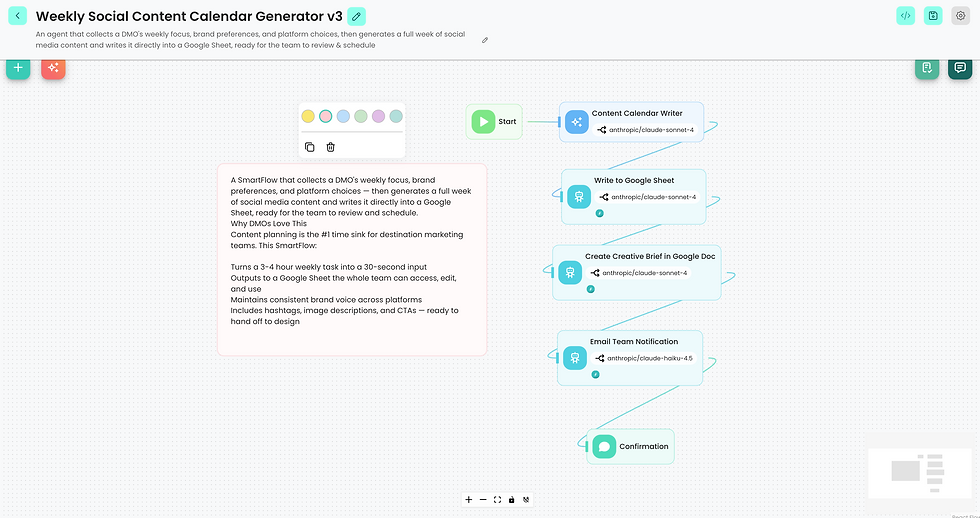
Most teams get to something genuinely useful within the first run or two. The captions will need a human eye and some posts will need adjusting for your destination's specific voice. But you're editing a complete week of content instead of building it from scratch. That's a fundamentally different place to start.
What the Output Looks Like
Here's what comes back after you run it. First, a Google Sheet with all the content:

Every post has everything your team needs to execute. Caption written in your brand voice. Hashtags curated for the platform. Image description ready to hand to your designer or photographer. CTA that matches the social content type. Best time to post based on platform best practices. Content pillar labeled so you can see your week's mix at a glance.
Next, alongside the Google Sheet, the agent creates a visual creative brief in Google Docs. This isn't a list of caption ideas, it's a production document. A shot list for every post with concept direction, visual requirements, mood and style guidance, image specs, and deadlines. Something your content team can actually work from.

Finally, all of this is delivered to your team in a formatted email. They open their sheet and their brief and the week is planned before the Monday morning meeting even starts.

Most teams find the difference between editing a complete week of content versus building it from scratch is about two to three hours a week they don't get back any other way.
Bonus: Taking It One Step Further
Once you're comfortable with the agent, there's an upgrade worth knowing about.
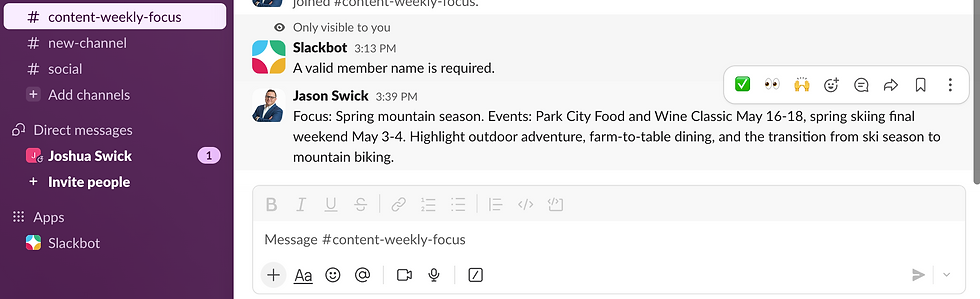
Your marketing team is probably already sending Slack (or Google Chat or Team's) messages. Through SwixConnect you can set up Slack as a trigger so that a slack message becomes the input that fires the agent automatically, rather than using the agent chat interface.
First, create a dedicated channel for the agent. We called ours # content-weekly-focus. When someone sends a message in that channel, the agent fires on its own. No more opening the platform and typing your message in the agent chat window. The Google Sheet, the Visual Creative Brief, and the team email all happen automatically in the background once a slack message is sent.
The behavior change required from your team is essentially zero. They send a message in Slack the way they already do. The agent handles the rest:
Setting up the Slack trigger takes about five minutes and is available on the platform today:

Take it even further
Once your agent is refined and your team has reviewed the Google Sheet and approved the posts, the next logical step is getting them into your social platforms without copying and pasting every post manually.
Build a second agent, a Social Publisher, that reads your approved Google Sheet and pushes each post directly to Meta Business Suite as a draft, ready for your team to review, refine and schedule across Facebook and Instagram.
That connection exists in the platform today. Let me know in the comments if you want to see that agent in a future edition.
Let's Put That in Perspective
One message. Thirty seconds of input.
What you got back: a complete week of platform-specific social media content across every channel, a visual creative brief your content team can actually use, and an email notification the moment everything was ready.
What it replaced: three to four hours of staring at a blank screen every Monday morning, writing captions from scratch, researching hashtags, briefing your designer, and coordinating with your team about what's going out this week.
For most DMO marketing teams running this every week, that's roughly 150 to 200 hours a year back in your calendar. From one message and thirty seconds.
What to Do After It Works
Share the success! Show your marketing coordinator. Let them run it on next week's content. Watch what happens when someone who has been spending hours creating social content realizes that part of their job just got handled automatically.
That's how this spreads inside an organization. Not through a training mandate or an all-hands session. Through one person seeing it work on something real and showing the next person.
Lastly, this is only a place to start. You can take these agents and iterate over time, adding additional capabilities and functionality to get them just right for your organization.
Coming Up Next Week
The third and final edition in this agent series covers communications.
Specifically the press trip itinerary — building a complete briefing package for travel writers, influencers, or tour operators. It's one of those tasks that takes forever and follows roughly the same structure every time.
There's an agent for that too.
Last week was leadership. This week is marketing. Same process, different team, different hours back in the calendar. You don't have to be an AI expert you just have to take that first step, stay curious, and be willing to learn something new.
Next week is communications. Then the series is done and you'll have three agents running across three departments. That's a different organization than the one you started with.
More soon.
-Jason
I write about AI and destination marketing for DMO professionals. If you want pieces like this a few days before they go public, you can join the early access list at https://www.swix.ai/#insider


