
Building Your First AI Agent — A Three-Step Guide for DMO Leaders

Updated: Apr 21

You know the feeling.
You sit down to do a task you've done a hundred times. You already know it's going to take hours. You already know it's going to feel like starting from scratch even though you've done it before. And somewhere in the back of your head, a quiet voice says: there has to be a better way to do this.
There is. And it's probably easier to set up than you think.
Over the next three weeks I'm going to walk you through building three real AI agents in our platform, one for leadership, one for marketing, one for communications, start to finish, so you know exactly what it feels like to build one and can decide for yourself if it's worth trying with your team.
No big ideas. No industry context. Just walkthroughs.
This week we're starting with leadership. Specifically, the task that probably eats more executive time than anything else in a DMO: the board report.
Why Most People Never Actually Start
The gap between "I should try this" and "I actually built something" is almost entirely psychological. It feels like it should be complicated. Like there's a technical step you're missing, a background you don't have, a learning curve that's going to eat a week you don't have to spare.
There isn't.
Most DMO professionals who build their first agent are surprised by two things: how straightforward the setup actually is, and how quickly they start getting time back. We're talking about tasks that used to take half a day running in under an hour. That's not a small thing for a team that's already stretched thin.
Let me show you exactly what that looks like.
Overview: What We're Building
This week we're walking through the Board Report Narrative Generator, an AI workflow built specifically for DMO leadership teams.
If you've ever spent a morning pulling numbers from three different places, reformatting them for a board that doesn't want to read a spreadsheet, and writing a narrative that makes the data mean something, this one is for you.
For this agent you upload your data. You answer a few questions. You get a structured first draft with an executive summary, performance highlights, areas of attention, and a forward outlook. Formatted for a board audience, not a marketing team.
What used to take three to five hours takes under an hour. And once it's set up, every reporting cycle after that runs the same way.
It doesn't replace your judgment. It replaces the blank page. And it gives your team capacity back for the work that actually requires a human.
Step by Step — Here's How to Build It
Step 1: Choose the right tool for the job.
Creating a board report narrative is a sequential process, meaning it follows a set of steps in a linear fashion. For step-by-step agents in our platform, we would create an ActionFlow.
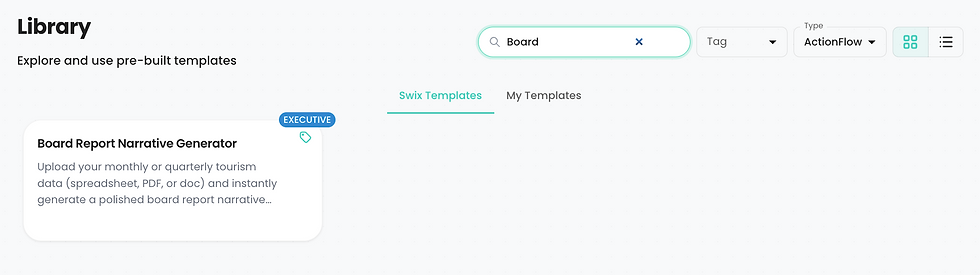
Head to our template library. Search "Board Report." Here we'll find the Board Report Narrative Generator already built and ready to customize. You don't start from scratch. You start from something that already works and make it yours. That's the part most people don't expect. You're not building from nothing. The hard work is often already done.
Don't have what you're looking for in our library?
Click the orange Generate with AI button and describe what you want the agent to do and the expected outcome. The more detail you can provide the better. Click 'generate' and our AI will create the agent for you. It's exactly what I did when I first created this Board Report Narrative agent before copying it into the library:

Not great at writing prompts? You're not alone. Our AI chat (or most any chat tool for that matter) can help you with that.
Step 2: Configure the inputs.
Open the template. You'll see six steps already configured, with prompts, that the flow will follow.
The preview panel on the right shows exactly what your team will see when they run it: three fields and a file upload. That's the entire input. No technical setup, no integrations to configure, no learning curve:

Take a few minutes to review and refine the AI prompt in step five:

This is where you can add your destination's specific voice, your board's preferred format, or any reporting conventions your organization already uses. You're not writing code. You're editing instructions the way you'd brief a new team member.
Most people finish this step in less than fifteen minutes.
Test it on a real task, not a demo scenario.
This is probably the most important step. Don't test it with sample data or a hypothetical scenario like I did. Use your actual last month's numbers. Your real data. Your real stakeholders. The output will be meaningfully better and you'll know immediately whether it's saving your team real time, which it will.
Adjust based on what comes back.
The first output probably won't be perfect. That's expected and it's fine. Read through it, note what landed and what didn't, and adjust the prompt in step five accordingly. Most teams get to something genuinely useful within two or three runs. After that, it becomes the thing you reach for automatically every reporting cycle.
Step 3: What the Output Looks Like
Using a sample destination and data, here's what came back after I ran it:

You're looking at an amazing output your board would recognize. Executive summary at the top. Performance highlights with context. Areas of attention that don't bury the lead. A forward outlook that sets up the conversation rather than just reporting what happened.
Is it the final draft? Of course not. You still review it, adjust the framing, add the context the data didn't capture. But the two hours of staring at a spreadsheet before a single sentence exists. That part is gone. You're editing instead of writing from scratch, and for most teams that turns a half-day task into under an hour.
That time doesn't disappear. It goes back to your team. Back to the strategic work, the creative work, the relationship work that nobody can automate.
Bonus Step: What You Can Do With the Output Next
Once your board report narrative is generated, you don't have to stop there.
Every agent output can be continued directly in our AI Chat. This is where the magic happens:

That means you can take the narrative output the agent just produced and in a single conversation turn it into a full board presentation, a formatted report with dynamic charts and sections, or a dashboard your leadership team can review.
Here's what that looks like in practice:


One workflow. Three potential outputs. Report narrative, board presentation, formatted document — all from the same starting point, all in the same session.
Let's Put That in Perspective
Here's the full picture of what just happened.
You filled in three fields. You uploaded one file. You typed "turn this into a report" in Chat.
That's it. That's the whole process.
What you got back: a board report narrative with an executive summary, performance highlights, areas of attention, and a forward outlook. A board-ready presentation. A formatted report with dynamic charts and sections.
What it replaced: three to five hours of pulling data from multiple sources, formatting it for a non-marketing audience, writing a narrative from scratch, and building slides manually.
For most DMO teams that run this every month, that's roughly 36 to 60 hours a year back in your calendar from one agentic workflow. Not from some ambitious AI transformation project. From three fields, a file upload, and one sentence in a chat window.
That's what easy looks like when it's actually easy.
What to Do After It Works
Don't keep it to yourself.
Share it with one other person on your team. Show them what you built, walk them through how it works, and let them run it on their own task. That's it. No grand rollout plan, no all-hands training session, no formal process.
One person showing one other person is how AI actually spreads inside an organization. Collaboratively, on real work, in small groups. Everything in this series has been pointing to that.
And every person who builds one agent and shares it is creating capacity for their whole team, not just themselves.
Coming Up Over the Next Two Weeks
Next week we're moving to marketing ops. Specifically the social media planning task that eats half a day every week for most DMO marketing coordinators. I'll walk through the Social Media Calendar Agent the same way we did this one: step by step, real output, nothing theoretical.
The week after that we're covering communications. The press trip itinerary, building a complete briefing package for travel writers, influencers, or tour operators, is one of those tasks that takes forever and follows roughly the same structure every time. There's an agent for that too.
Three weeks. Three departments. Three practical agents your team can actually use. Each one easier to build than you probably think.
Lastly, it's worth mentioning that additional capability and complexity can be added to any of these agents over time. For instance connecting it to tools (email, calendar, a spreadsheet), having it triggered by events or time (i.e. I want this to run every tuesday at 9:00 a.m. EST) or sending you or your team an email or slack message when it's done.
You said you'd try it. Here's exactly how. A few minutes of initial work that your future self will thank you for.
-Jason
I write about AI and destination marketing for DMO professionals. If you want pieces like this a few days before they go public, you can join the early access list at https://www.swix.ai/#insider


