
Inside Swix AI
- FeaturesChat, assistants, automations and agents, built for destination teams.
- Agents (AI Workforce)An agent team that plans the work, does it, and checks in when a person has to decide.
- AI AutomationsQuickFlows, ActionFlows and SmartFlows for the work you repeat.
- AssistantsCustom assistants that know your role, your files and your voice.
- ChatAsk in plain words, get back reports, decks and dashboards.
- AI knowledge baseOne library of your files that everything in Swix reads from.
- Security & TrustHow your data is encrypted, isolated and never used to train outside AI models.
 In their words30 min“What used to take me hours now takes me 30 minutes tops.”Jenna McCormick · Destination Creative & Content Manager, Visit Cheyenne
 AgentsPlans the work, does it, and stops for your okay.
 AI AutomationsA monthly board report, drafted in five numbered steps.
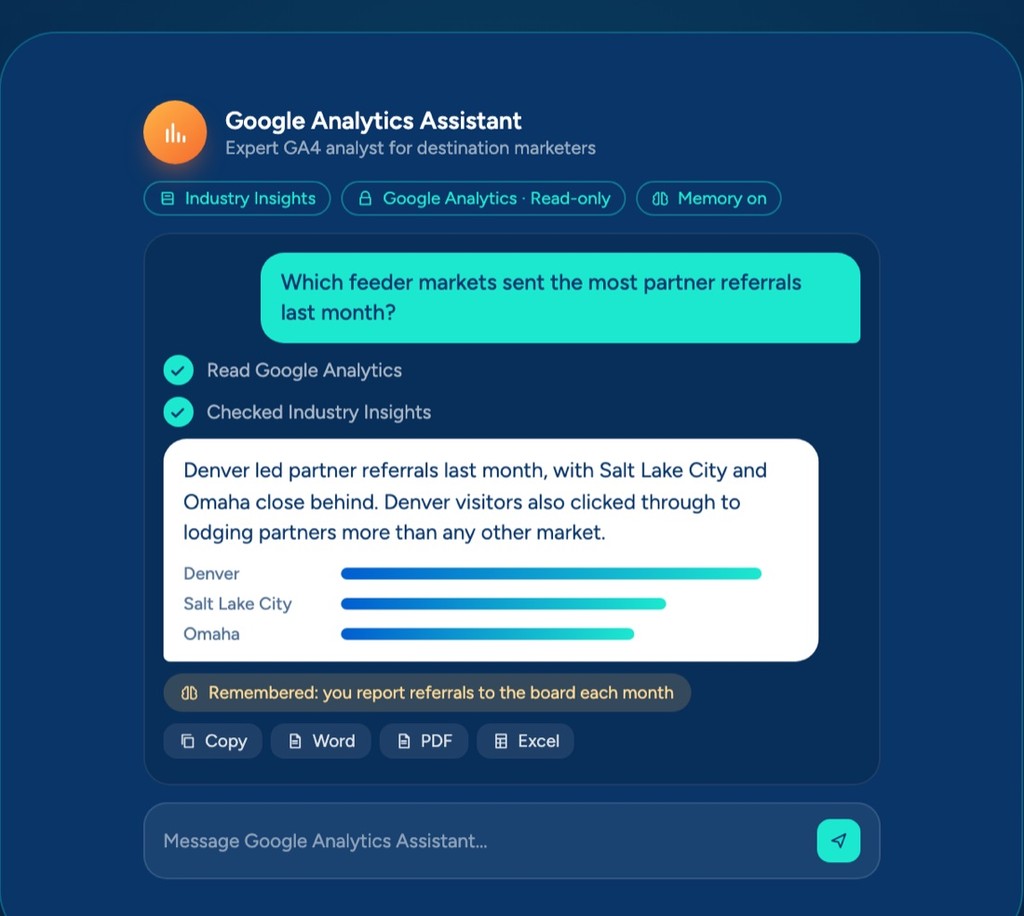 AssistantsAnswers from your Google Analytics, with read-only access.
 ChatOne prompt, a finished board report you can share.
 AI knowledge baseYour files, read by every assistant, agent and flow.
Swix AI
- Reading the inbox
- Drafting RFP replies
- Updating partner listings
- Agents on shift
- Swix
- AI
- Open
Home
BlogSep 19, 2025 · 4 min
AI Agents for DMOs: What They Are and Why They Might Actually Help
What an AI agent actually is, in plain English, and a few places it could take routine work off a DMO team's plate.

A simple guide to understanding AI agents and how platforms like Swix AI can help destination marketing organizations work smarter, not harder.

Most DMO teams I talk to aren't short on work. There's always another visitor email to answer, another report to pull together, another batch of social posts to schedule, all while trying to actually market the destination. The day-to-day operations have a way of crowding out the strategic work.
That's where AI agents come in. Not as a magic fix, but as a way to offload some of the repetitive stuff so your team can focus on the work that actually requires a human.
What Are AI Agents, Exactly?
Think of an AI agent as a digital team member that can actually do things across your systems, not just answer questions. A regular chatbot might help a visitor find restaurant recommendations. An AI agent can go further:
- Read through visitor feedback emails and categorize them by topic
- Monitor social mentions of your destination and respond to straightforward questions
- Pull visitor stats from multiple sources and compile them into your monthly reports
- Update website content based on seasonal events or new attractions
The key difference is workflow. Instead of you doing each step manually (check emails, copy info, paste into a report, send to stakeholders), an agent can handle that entire sequence on its own.
What This Looks Like in Practice
Visitor inquiries at all hours. Your agent can respond to common questions about attractions, accommodations, and events even when your team is offline. For more complex requests, it collects the details and flags them for follow-up during business hours.
Example: A visitor emails asking about pet-friendly restaurants near downtown. Your agent sends a curated list from your database, adds their email to your newsletter, and logs the inquiry type so you know what content to prioritize later.
Reporting without the headache. Instead of spending hours pulling visitor numbers from analytics, partner reports, and attraction stats, your agent compiles it automatically and creates a summary for your board meeting.
Example: Every month, your agent pulls visitor arrival data, top social posts, website traffic sources, and partner booking numbers into a one-page dashboard showing how your marketing is actually performing.
Partnership opportunities you'd otherwise miss. Your agent can monitor industry news, track when local businesses get mentioned in travel blogs, and surface collaboration opportunities before they slip by.
Example: When a food blogger writes about a local restaurant, your agent adds that restaurant to your "featured in media" list, sends a quick congrats to the owner, and suggests they participate in your next restaurant week campaign.
Content that stays current. Your agent can track seasonal events, weather, and local happenings to suggest timely content updates and social posts.
Example: When weather conditions are perfect for hiking, your agent schedules posts featuring your best trail maps and suggests newsletter content around outdoor activities.
Why Platforms Like Swix AI Make This Easier
Building AI agents used to require developers and months of work. That's changed.
No coding required. You can build agents using a drag-and-drop interface. Connect actions together visually, kind of like building a flowchart. Want your agent to check emails, update a spreadsheet, and send an alert? Just link those steps.
Designed for marketing teams. Unlike generic AI tools, platforms built for business use already understand marketing workflows. They connect with your email, social accounts, analytics, and CMS without a lot of custom setup.
Start small. You don't have to automate everything at once. Start with one task, like sorting visitor inquiries, and add more as you get comfortable.
Fits DMO budgets. You can get started for a lot less than custom development. Less than a part-time intern, but available around the clock.
A Simple Way to Get Started
Week 1: Find your time drains. Look at your team's weekly routine and identify the most repetitive tasks. Common ones: sorting visitor inquiries, compiling monthly reports, scheduling social posts, updating event calendars.
Week 2: Pick one. Choose the task that takes the most time or happens most often. Email management is usually a solid starting point.
Week 3: Build your first agent. Using a platform like Swix AI, set up a simple agent to handle that task. There are templates designed specifically for DMO teams.
Week 4: Test and adjust. Let the agent run for a week, then review. Tweak based on what worked and what didn't.
The Bottom Line
Destination marketing is about creating experiences and telling stories. Your team shouldn't be spending hours on data entry, email sorting, and report assembly when that work can be automated.
AI agents aren't about replacing your expertise. They're about freeing you up to use it where it matters. Let the agents handle the routine operational stuff while your team focuses on campaigns, partnerships, and visitor experience.
And you don't need to be technical to make this work. If you can use email and social media, you can set up an AI agent. The platforms are built for marketers, not programmers.
If you're curious how this could work for your team, I'm happy to walk through your current processes and identify where automation might actually make a difference.
BlogSep 19, 2025 · 4 min
AI Agents for DMOs: What They Are and Why They Might Actually Help
What an AI agent actually is, in plain English, and a few places it could take routine work off a DMO team's plate.
A simple guide to understanding AI agents and how platforms like Swix AI can help destination marketing organizations work smarter, not harder.
Most DMO teams I talk to aren't short on work. There's always another visitor email to answer, another report to pull together, another batch of social posts to schedule, all while trying to actually market the destination. The day-to-day operations have a way of crowding out the strategic work.
That's where AI agents come in. Not as a magic fix, but as a way to offload some of the repetitive stuff so your team can focus on the work that actually requires a human.
What Are AI Agents, Exactly?
Think of an AI agent as a digital team member that can actually do things across your systems, not just answer questions. A regular chatbot might help a visitor find restaurant recommendations. An AI agent can go further:
- Read through visitor feedback emails and categorize them by topic
- Monitor social mentions of your destination and respond to straightforward questions
- Pull visitor stats from multiple sources and compile them into your monthly reports
- Update website content based on seasonal events or new attractions
The key difference is workflow. Instead of you doing each step manually (check emails, copy info, paste into a report, send to stakeholders), an agent can handle that entire sequence on its own.
What This Looks Like in Practice
Visitor inquiries at all hours. Your agent can respond to common questions about attractions, accommodations, and events even when your team is offline. For more complex requests, it collects the details and flags them for follow-up during business hours.
Example: A visitor emails asking about pet-friendly restaurants near downtown. Your agent sends a curated list from your database, adds their email to your newsletter, and logs the inquiry type so you know what content to prioritize later.
Reporting without the headache. Instead of spending hours pulling visitor numbers from analytics, partner reports, and attraction stats, your agent compiles it automatically and creates a summary for your board meeting.
Example: Every month, your agent pulls visitor arrival data, top social posts, website traffic sources, and partner booking numbers into a one-page dashboard showing how your marketing is actually performing.
Partnership opportunities you'd otherwise miss. Your agent can monitor industry news, track when local businesses get mentioned in travel blogs, and surface collaboration opportunities before they slip by.
Example: When a food blogger writes about a local restaurant, your agent adds that restaurant to your "featured in media" list, sends a quick congrats to the owner, and suggests they participate in your next restaurant week campaign.
Content that stays current. Your agent can track seasonal events, weather, and local happenings to suggest timely content updates and social posts.
Example: When weather conditions are perfect for hiking, your agent schedules posts featuring your best trail maps and suggests newsletter content around outdoor activities.
Why Platforms Like Swix AI Make This Easier
Building AI agents used to require developers and months of work. That's changed.
No coding required. You can build agents using a drag-and-drop interface. Connect actions together visually, kind of like building a flowchart. Want your agent to check emails, update a spreadsheet, and send an alert? Just link those steps.
Designed for marketing teams. Unlike generic AI tools, platforms built for business use already understand marketing workflows. They connect with your email, social accounts, analytics, and CMS without a lot of custom setup.
Start small. You don't have to automate everything at once. Start with one task, like sorting visitor inquiries, and add more as you get comfortable.
Fits DMO budgets. You can get started for a lot less than custom development. Less than a part-time intern, but available around the clock.
A Simple Way to Get Started
Week 1: Find your time drains. Look at your team's weekly routine and identify the most repetitive tasks. Common ones: sorting visitor inquiries, compiling monthly reports, scheduling social posts, updating event calendars.
Week 2: Pick one. Choose the task that takes the most time or happens most often. Email management is usually a solid starting point.
Week 3: Build your first agent. Using a platform like Swix AI, set up a simple agent to handle that task. There are templates designed specifically for DMO teams.
Week 4: Test and adjust. Let the agent run for a week, then review. Tweak based on what worked and what didn't.
The Bottom Line
Destination marketing is about creating experiences and telling stories. Your team shouldn't be spending hours on data entry, email sorting, and report assembly when that work can be automated.
AI agents aren't about replacing your expertise. They're about freeing you up to use it where it matters. Let the agents handle the routine operational stuff while your team focuses on campaigns, partnerships, and visitor experience.
And you don't need to be technical to make this work. If you can use email and social media, you can set up an AI agent. The platforms are built for marketers, not programmers.
If you're curious how this could work for your team, I'm happy to walk through your current processes and identify where automation might actually make a difference.
Book a demo
Ready when you are.
Tell us where the hours go. We'll show you Swix working on your destination's real work, and what your first 60 days would look like.
No slides. No obligation.
Book a demo
Ready when you are.
Tell us where the hours go. We'll show you Swix working on your destination's real work, and what your first 60 days would look like.
No slides. No obligation.